Import a drawing style
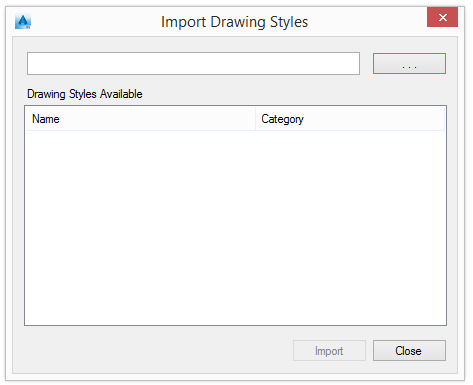
- Select a category in which to import the drawing style. Click Import
 .
. 
- Click
 .
. - From the "Import" dialog box, select the .mdb file with the drawing style to import. The available drawing styles are listed in the Available Drawing Styles table.
- Select a drawing style and click Import.
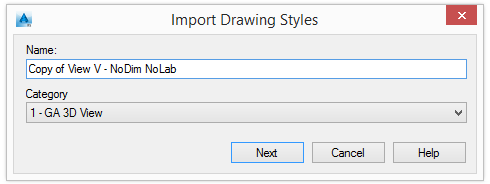
- Change the name of the drawing style and the category (as necessary) and click Next to import the drawing style.
Export a drawing style
- Select a drawing style to export.
- Click Export
 .
. - In the "Import" dialog box, enter the name of the export database file.
- Click Export.
The drawing style is exported as an .mdb file.
Compact the database
The database size may increase after deep copying a drawing style. The Compact database function is used to decrease the size of the database.
The Compact database function searches for equal records inside all detail tables of the selected database (except control tables such as DetRole, etc.). It combines the records and updates all records that have a relationship to the current combined object.
- Click Compact
 .
. 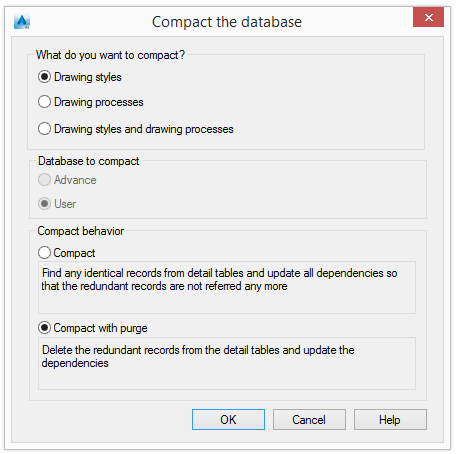
- Select what to compact (drawing styles and/or drawing processes) and the compacting method.
- Click OK to start the compacting process.