Advance Steel projects consist of several files. For better management the files must be saved in the same location.
Project structure
Advance Steel projects consist in several files:
- A master file - the .dwg file containing the model
- A set of derived files: detail drawings, BOMs, NC files etc
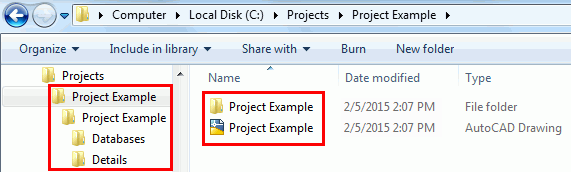
It is recommended to create a folder with the same name as the model .dwg file in the desired location and save the model drawing in the folder and with the same name. As the project evolves and derived documents are created, Advance Steel creates a sub-folder in the master .dwg file location, named as the .dwg file. Within this folder, sub-folders are created automatically as required for Details (drawings), BOMs, Calculations, NC files etc.
Example:
Project information
The project information is used for the automatic filling of a title block in the drawing creation (and BOMs). Project information is set for the model and saved with the model .dwg file.
Project creation steps
To start a new project perform the following steps:
- Start a new drawing
- Set the project information
- Save the file