Before creating the project documentation (drawings, BOMs etc.), the structure must be numbered. The basis for numbering is finding identical parts that should have the same mark.
Each object in Advance Steel has two part marks: a Single Part number and an Assembly part number. The basis for numbering is finding identical parts that should have the same mark.
During the numbering process, the numbering tool:
- Analyzes the model to identify equal parts and determine quantities
- Analyzes the relationship between parts to identify assemblies and main parts
- Assigns part and assembly numbers to objects in the structure.
Single Parts and Assemblies are automatically numbered for the entire model.
The elements are compared by geometry, material properties, coating, and commodity (and behavior). The properties name and lot/phase are not considered for numbering. The Model Role is used by the prefix tool to assign prefixes but it is not used directly for numbering.
Types of parts in the model
During the numbering process, an Advance Steel element can be identified as one of the three types of part:
- Main part - The heavies (larges) part of an assembly. It affects numbering. Assembly drawing views are oriented according to the main part such that the main part is usually horizontal (depending on the Drawing Style).
- Single part - All parts that are not main parts.
- Standalone part - A part that has no attached parts. It may be considered an assembly of only one part.
Numbering prefix
In a steel structure, to make the difference between single parts and assemblies, prefixes can be used to have distinct part marks.
Prefixes can be manually assigned, separately for parts and assemblies, or automatically assigned during the numbering process, according to the model role of the model elements (e. g. : beam, column, rafter, plate etc.).
The numbering tool
Advance Steel numbering tool automatically numbers Single Parts and Assemblies for the entire model.
If nothing is selected the entire model is numbered. When Advance objects are selected only these items are numbered. The results in either case are displayed in a dialog box (or by a default setting, they can be recorded in a text file that can be saved).
Main part of an assembly
Main part assignment is either performed manually or by the numbering process using Create main part of assembly that automatically detects attached parts. Alternatively, during assembly numbering, the biggest part automatically becomes the main part.
Numbering workflow
This workflow provides an overview of the automatic numbering process.
- At first, all structural parts should be numbered, so start with single part marks.
- The program then determines the assembly marks for parts connected in the shop. The biggest part of an assembly is the main part and will get an assembly mark and all other parts are considered attached and will have a single part mark.
- Standard parts are numbered using additional options. Any part in the current model that matches a Standard Part in the template will get the same mark (single part mark or assembly mark, according to the situation).
- A post numbering method can be applied after the initial numbering is complete in order to obtain the desired result.
During the numbering process beams and then plates are the first to be numbered. In each case, the group with the most elements will get the lowest number.
Switch between Single Parts and Assemblies
This button is a switch between Single Parts and Assemblies. According to the switch position, the numbering tools refer to single parts or to assemblies.
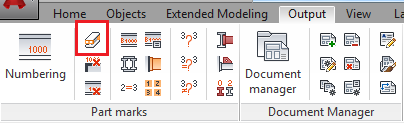

|
Switches to single parts. In the Numbering dialog box, only Process single parts is selected. |

|
Switches to assemblies. In the Numbering dialog box, only Process assemblies is selected. |
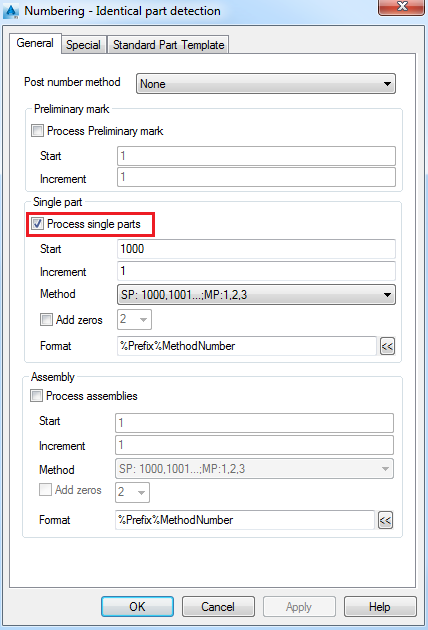

- Unless both single part and assembly numbering are done together (recommended), then single part numbering must be done first.
- The numbering for single parts and assembly parts can be performed in one step or separately, regardless of the toggle switch setting, using the check boxes in the Numbering dialog box, on the General tab.