Set up the New Curve tools
To set what parameterization and degree the curves you draw will have, open the tool’s option box and set the Knot Spacing and Curve Degree options.
Draw curves by placing CVs
- Choose Curves > New Curves > New CV Curve
 .
. - Click in view windows to place the CVs of the new curve, or type coordinates for the CV locations.
For a degree 3 curve (default), the curve will only appear after 4 CVs have been placed.
Note:The general rule is that a curve of degree m requires m+1 CVs before becoming visible. To see the curve sooner, turn on Progressive Degree in the option box.
Tip:The first CV in the curve is shown as a square and the second as a “U” instead of a cross. This helps show the direction of the curve.
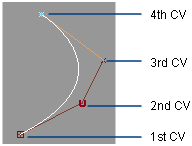
- Choose the tool again to start another curve.
Draw curves by placing edit points
- Choose Curves > New Curves > New Edit Point Curve
 .
. - Click in view windows to place the edit points of the new curve, or type coordinates for the CV locations.
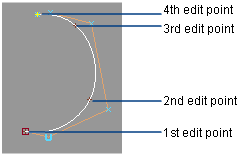
- Choose the tool again to start another curve. Tip:
This tool is useful when you want to create a single span curve from two end points.
Tip:You can continue drawing curves between view windows. For example, click the first point in the Top window, click the second point in the Back window, and so on.
Connect two points with a straight curve
- Choose Curves > New Curves > New Edit Point Curve.
- Click the first point. You can use curve snapping to snap the point to a curve or surface.
- Click the second point.
The new curve is a straight line between the two points. To make the curve tangent or curvature continuous, use Object Edit > Align > Align to align the new curve with the existing objects, or BlendCrv Tools > Blend Curve Create.
Add more points to a finished curve
- Use the Curve Edit > Modify > Add points
 tool.
tool.