The Factory Design Utilities user interface is located on the Factory tab. A blend of Factory and standard Navisworks panels create the default Factory working environment.
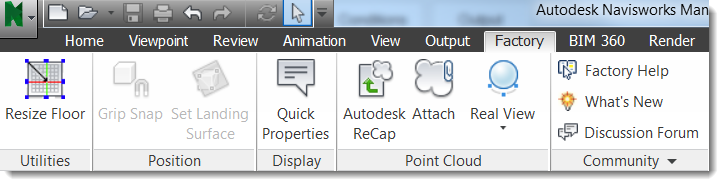
Resize Floor: Drag handles to change the floor size.
Grip Snap: Drag models to a new location or precisely position them.
Set Landing Surface: Define how models sit on the floor.
Quick Properties: Control the visibility of tooltips containing property information. By default, Quick Properties shows the object name and type. Additional information may appear based on your Quick Properties settings in Options.
Autodesk ReCap: Open ReCap to index scans, and create and edit point cloud project files.
Attach: Attach point cloud scans and ReCap project files.
Real View: Control Real View scan indicator and label display.
Factory Help: Access Factory Design Suite online help.
What's New: Learn about new features included in this release.
Discussion Forum: Access Factory-related online discussion topics.
Community drop-down menu: Access the Factory Asset Warehouse, the Factory Design Suite YouTube channel, and the IdeaStation where you can share your ideas with the Factory Development team about how to improve the Factory Design Suite.