The RS-422 serial connection between the VTR and your workstation enables full remote control of the device from Flame Assist. Connected VTR devices send their current status to Flame Assist, and this status is displayed in the VTR Input and VTR Output modules.
Verifying the VTR Status
The following illustration shows a VTR status display.
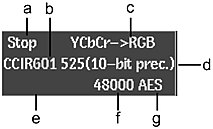
(a) VTR Status (b) VTR Timing (c) Colour Space (d) Bit Precision (e) Control Mode (f) Audio Sample Rate (g) Audio Input/Output Type
Other VTR status values include.
| VTR field: | Indicates: |
|---|---|
| VTR Status | Play, Play Lock, Stop, Jog, Fast Forward (FFW), Rewind (RWD), 3x, 4x, 8x, 15x, 30x. When the field is blank the VTR is disengaged. |
| VTR Timing | The video timing currently configured on the video device. |
| Colour Space | The colour space conversion method for both input and output of clips. |
| Control Mode (LOCAL, REMOTE, or REC INHIBIT) | Whether the VTR is in Local or Remote control mode. Local appears in yellow when the VTR is in Local mode. In Local mode, the VTR cannot be controlled from Flame Assist. You can switch the VTR between Local and Remote mode only on the VTR. Rec Inhibit implies REMOTE mode, but you cannot output to the tape. |
| Audio Sample Rate | The audio sampling rate when you input or output from the VTR. |
| Audio Input/Output Type | The source audio interface type when inputting and the destination audio interface type when outputting. |
| Bit Precision | The accuracy used (SDI bit depth) when transferring data. This cannot be changed. |