Data Flows
The HumanIK data flow differs slightly depending on whether you are using the inverse kinematics solver or the retargeting solver.
Inverse kinematics
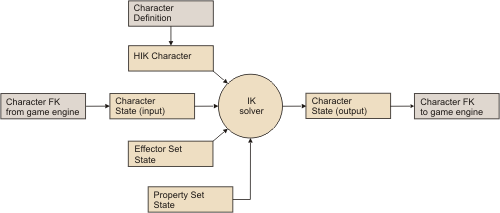
To use the HumanIK inverse kinematics solver, you must provide:
- An HIKCharacter that represents your character.
- An HIKCharacterState that contains the current FK position and rotation of each of your character’s Nodes within your game engine.
- An HIKEffectorSetState that contains the target position and rotation for your character’s body parts.
- An HIKPropertySetState that provides a variety of parameters and configuration settings for the character.
The solver stores the resulting pose for your character in the same HIKCharacterState you provided with the character’s starting pose.
Retargeting
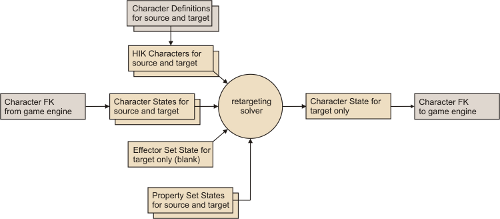
To use the HumanIK retargeting solver, you must provide:
- Two HIKCharacters that represent your source and target characters.
- Two HIKCharacterStates that contain the current FK position and rotation of your source and target characters’ Nodes within your game engine.
- A blank HIKEffectorSetState that the retargeting solver sets up internally and uses to call the inverse kinematics solver on the target character.
- Two HIKPropertySetStates that provide a variety of parameters and configuration settings for your source and target characters.
The solver stores the resulting pose for your target character in the same HIKCharacterState you provided with the target character’s starting pose.
 Except where otherwise noted, this work is licensed under a Creative Commons Attribution-NonCommercial-ShareAlike 3.0 Unported License. Please see the Autodesk Creative Commons FAQ for more information.