Coordinates and Units
Coordinate system
HumanIK represents three-dimensional space using a right-handed orthogonal coordinate system. The three axes are defined using the following convention:
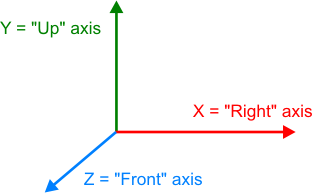
Note that the positive direction of the Front axis is out of the screen, not into the screen.
If your game uses a different coordinate system, you must ensure that you swap axes correctly each time you exchange translation, rotation and scaling data between your project and HumanIK.
Units of Measure
HumanIK does not enforce the use of any particular unit of measure. For greatest efficiency, you can provide distance measurements using whatever unit you use in your game engine; the HumanIK solvers will provide the results of their calculations using the same units.
Whichever units you choose, you must be consistent. Use the same units all the time, including:
- Any time you need to exchange translation data between your game and HumanIK. For example, when you set or retrieve the translation of a Node or an Effector along each axis.
- For the values of all character properties in your characters’ HIKPropertySetStates that maintain distance measurements. For example, the properties that maintain offsets for the hips and chest Effectors (e.g. HIKHipsTOffsetXId) and the properties that specify the dimensions of the character’s feet and hands for floor contact (e.g. HIKFootBottomToAnkleId).
Note that the default values of these properties are set such that they will be appropriate for a character approximately 180 world units tall; therefore, these default values are suited for projects that use centimeters as a distance of measure. If your game uses a different unit of measure, you will need to adjust these default values accordingly. For example, if your game uses meters as a unit of measure, the default values of these character properties will be 100 times too large.
 Except where otherwise noted, this work is licensed under a Creative Commons Attribution-NonCommercial-ShareAlike 3.0 Unported License. Please see the Autodesk Creative Commons FAQ for more information.