There are some areas where the 20 mm tool did not fit. Remove more of the remaining material in those areas with a Pocket rest milling operation.
- On the ribbon, click
CAM tab
 3D Milling panel
Pocket
3D Milling panel
Pocket
 .
.
 Tool tab
- On the Tool tab, click the
 button.
 - Select the tool #13 - Ø6 R1 mm bullnose from the Tutorial4 library.
- Click
 to close the Tool Library dialog.
 Geometry tab
Next, remove the material the previous operation did not remove.
- Click the Geometry tab.
- Enable the Rest Machining check box.
 Passes tab
- Click the Passes tab.
- Set Smoothing deviation: to: 1 mm
- Set Maximum roughing stepdown: to: 2 mm
- Set Radial stock to leave: to: 0.3 mm
 Linking tab
Note: For this tutorial, the Shortest path retraction policy is used. This gives the shortest possible rapid movement paths, but can only be used on high speed-enabled machines where rapid motion is interpolated as linear moves. Should you wish to machine the tutorial part on your machine, you may have to change this setting to suit your machine and control.
Start the Calculation
- Click
 at the bottom of the Operation dialog box, or right-click in the graphics window and select OK from the marking menu, to automatically start calculating the toolpath.
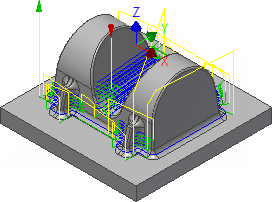
The toolpath is now calculated and a preview appears in the graphics window.
Continue to To Machine Steep Areas Using Contour...