A tapping operation differs only from a drilling operation in the type of cycle chosen from the Cycle tab. To simplify this step of the operation, we will just copy the existing drilling toolpath and edit it to create the new tapping toolpath.
- In the CAM Browser, right-click on the Drill1 node. (Do not be concerned if your Drill node appears with a number other than Drill1.)
- Select Duplicate from the pop-up context menu. This creates a copy of the operation below the original one.
- Left-click on the new operation (Copy of Drill1).
- Enter a new name, such as Tapping M6 and press Enter.
- Right-click on the operation Tapping M6.
- Select Edit from the pop-up context menu.
Next, you edit the tool and parameters.
 Tool tab
Create and select a new tapping tool.
- On the Tool tab, click the
 button to open the Tool Library.
 - Click the
 button.
 - On the General tab, change Number to 8.
- On the Cutter tab, change Type to Tap (Right Hand).
- Change Diameter to 6 mm.
- Change Flute length to 15 mm.
- On the Feed & Speed tab, change Spindle speed to 400 rpm.
- Click the OK button to create your new tool.
- Click the Select button to select the tool for your operation and close the Tool Library dialog.
Important: If you want to run this toolpath on your machine tool, you may also need to set the Pitch parameter on the Cutter tab, as well as adjust the feed and speed parameters. The correct values can be found in the tool manufacturer's catalog.
 Cycle tab
Now, make this a tapping cycle instead of a drilling cycle.
- Click the Cycle tab and select Tapping from the Cycle type: drop-down menu.
Start the Calculation
- Click
 at the bottom of the Operation dialog box, or right-click in the graphics window and select OK from the marking menu, to calculate the toolpath. The resulting toolpath should look like this:
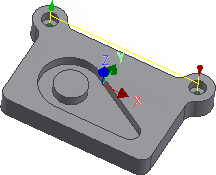
You have now completed all the machining strategies for this part. Continue to To Post Process the Toolpaths to finish the tutorial.