Activate the worker-server:
- Use the Inventor ETO Server Configurator (IntentSessionConfigurator.exe) located in your Windows Start menu.
- Your worker-server computer must be connected to the Internet at the time of activation. Assure port 443 (HTTPS) is open.
- On the Activation tab, sign into your Autodesk account. Your login is the ETO Admin account.
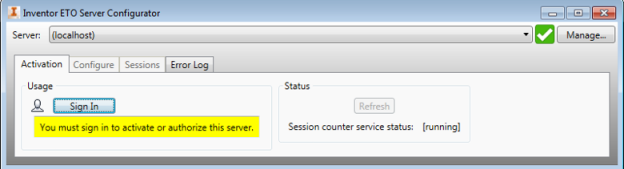
- Once signed in, use the Activate this server button to activate your machine as a worker-server. If another server is already active, your machine deactivates and a confirmation dialog box displays.
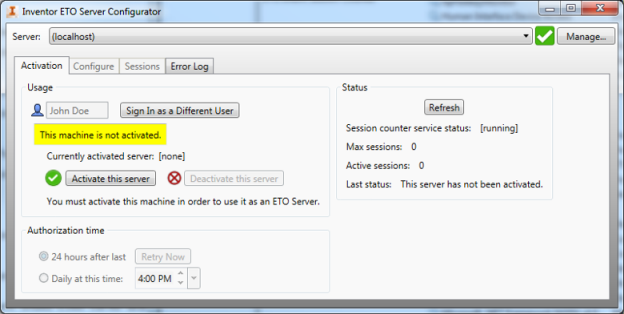
- Once the server is activated, set the Authorization time option.
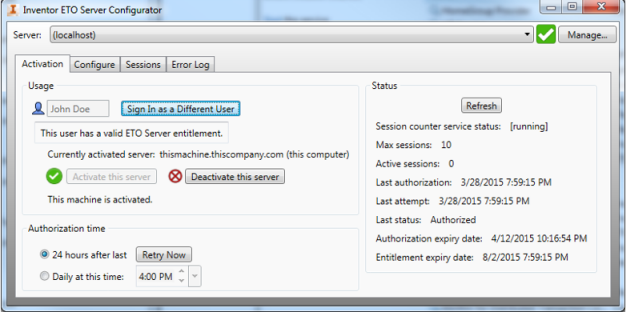
- The session counter service tries to contact the Autodesk license Web service daily to reauthorize the server. In the Inventor ETO Server Configurator dialog box, Activation tab, you can select a specific time of day you would like the server to be reauthorized.
You can reauthorize the server instantly by selecting the Retry Now button.
- After activating or reauthorizing, you can disable the Internet connection on the worker-server for several days at a time. Reconnect within 14 days after each authorization.