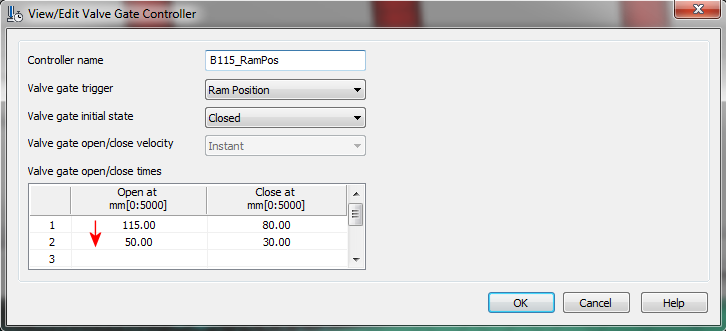
Valve gates can be triggered a number of ways. Valve gate control by Ram Position has been activated for 3D models starting with this release.
- Time
- Flow Front
- Pressure
- % Volume
- Ram Position
In prior releases, with 3D models, valve gate control by ram position has been available for selection but has been inactive, resulting in an error message that recommends selection of a different trigger. Starting with this release, all 5 options are now available for 3D models.
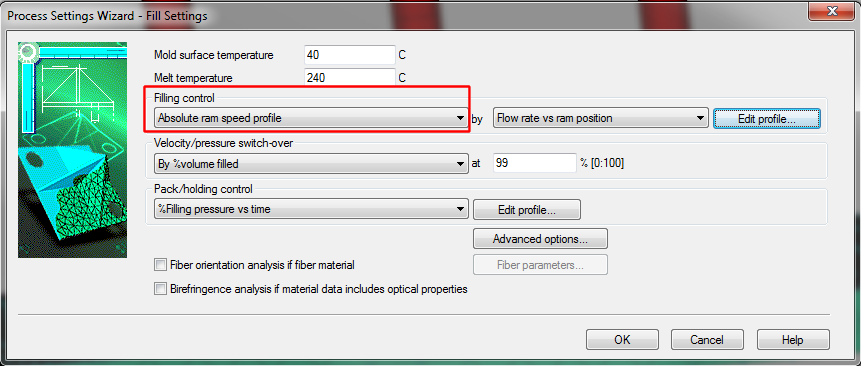
If you plan to trigger a valve gate by ram position, make sure that you have selected a Filling control option that includes a ram speed profile. To change the filling control, click  ()
()
Click Edit profile and check that the values in the Filling Control Profile Settings dialog are consistent with the valve gate controller profile. 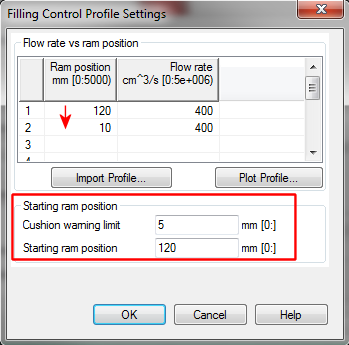
- the values you enter for the Ram position are entered in order of decreasing value,
- the Starting ram position values are consistent with the valve gate control values you have set