Raster (or image) files are pixel-based data, such as digital photographs, that you can use as backgrounds for feature and drawing data. For example, you can display an aerial photograph of a city under a layer of streets. Raster files are cataloged to optimize performance. You create a raster catalog as part of the load process.
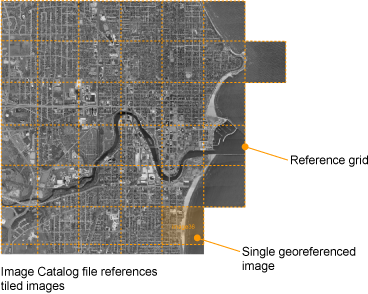
- A raster catalog file contains a list of image files and their lower-left and upper-right coordinates. When you access a layer that references a raster catalog, the Server scans the catalog file to find the images that correspond to the area being viewed, and then sends only the data for that area.
- An individual image file must be georeferenced, that is, it must have an associated file (for example, TFW for TIFF files) that specifies the location of the image within the coordinate system used in the map.
- TIFF, ECW, and MrSID files are loaded without conversion. All other formats are converted to TIFF during the load process.
Raster Image File Formats
The following table provides a brief description of the raster image file formats supported by Autodesk Infrastructure Studio:
| Format | File Extension | Description |
|---|---|---|
| BMP | .bmp | Microsoft Windows Bitmap |
| CALS | .cal | CALS MIL-R-28002A Type 1 Format |
| ECW | .ecw | Enhanced Compression Wavelet |
| GeoSPOT | .bil | Band Interleaved (GeoSPOT, others) Note that GeoSPOT files need their associated color index files, which have a .clr file extension. The CLR file should be in the same directory as the BIL file. |
| JPEG | .jpg, .jpeg | Joint Photographic Experts Group |
| MrSID | .sid | Multi-Resolution Seamless Image Database |
| PNG | .png | Portable Network Graphic |
| TGA | .tga | TrueVision Targa 2.0 Format |
| TIFF | .tif, .tiff | Tagged Image File Format |
Georeference File Formats
The following table lists the raster file formats supported by Autodesk Infrastructure Studio and their associated georeference files.
| Raster File Formats | Georeference file formats |
|---|---|
| .bmp | .bpw, .tab |
| .cal | .clw, .tab |
| .ecw | |
| .jpg/.jpeg | .jgw, .tab |
| .png | .pgw, .tab |
| .sid | |
| .tga | .taw, .tab |
| .tif/.tiff | .tfw, .tab |