You can use folders to organize resources in the Site Explorer. Sort resources by name or type.
Create a project folder that contains the following folders:
- Data:
-
Database connection resources, such as ODBC, Oracle, and ArcSDE.
- Load:
-
File-based data resources, such as DWG, SHP, and other files.
- Layer:
-
Layer resources that reference data resources.
- Watermark
- A resource you can add to a layer or map definition that contains text or an image superimposed on the layer or view.
- Map:
-
Map resources that reference layer resources.
- Symbol libraries:
-
Symbols libraries used to style elements on layers.
- Web layout:
-
Web layouts that reference maps.
To create a folder
- In the Site Explorer, click a site or folder.
- Click menu
 .
. You can also right-click a site name or folder and click
. - Enter a name for the new folder and press Enter.
The new folder is added to the selected folder or to the top of the tree if the site is selected.
To sort resources
- Click the arrow next to .
- Click or .
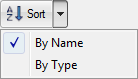
Click Sort to toggle between By Name and By Type sorting methods.