Infrastructure Map Server consists of numerous separate components, which should be installed in the following order:
- Autodesk Infrastructure Map Server
- Autodesk Infrastructure Web Server Extension (for application development)
- Autodesk Infrastructure Studio (for map authoring)
- Autodesk Infrastructure Application Extension (works with Oracle)
- Autodesk Infrastructure Administrator
The Technology Preview installer, which is found on the installation DVD, consists of the following components:
- Autodesk Infrastructure Mobile Viewer Extension
- Autodesk Infrastructure GeoREST Extension
You can access detailed information about hardware and software requirements for installation from the Installation HTML page of the media browser that appears when you insert the Infrastructure Map Server product DVD. Here is a short summary:
- Infrastructure Map Server and Web Server Extension run on both Windows and Linux.
- Web Server Extension runs on IIS and Apache (Windows) and Apache (Windows and Linux).
- Infrastructure Studio runs on Windows.
- The Infrastructure Map Server viewers work with Microsoft Internet Explorer, Mozilla Firefox, Apple Safari, and Google Chrome browsers. Refer to the system requirements for the supported version of each browser.
- The Infrastructure Web Server Extension supports application development in PHP, ASP, and JSP.
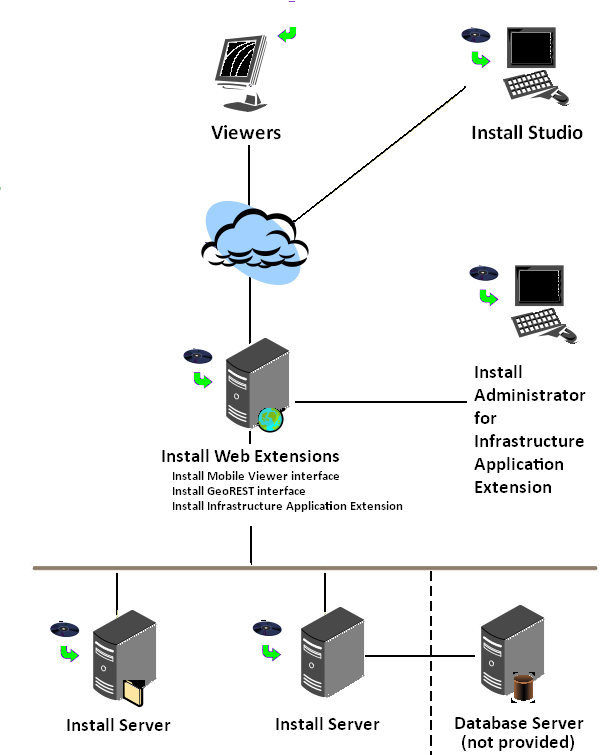
Typical site showing where to install the Infrastructure Map Server components