New noise, math and utility nodes available
A new Simplex Noise node has been added. In addition, new math and utility nodes are now available that enable you to: create a solid color, composite and color correct nodes, rewire RGBA channels, premultiply and un-premultiply nodes, and so forth. Float versions of color utility nodes are also available.
To create these nodes, ensure that the lookdevKit.mll plug-in is loaded via the Plug-in Manager.
Create shader plug-ins using the modern OpenGL API and visualize them in Viewport 2.0
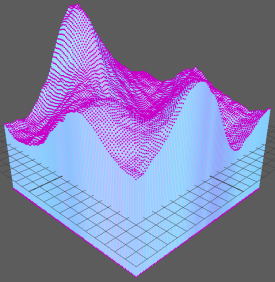
Use the modern OpenGL API to create shader programs that include geometry and tessellation stages, then use the glslShader.mll plug-in to load these shaders in .ogsfx file format and visualize them in Viewport 2.0 in OpenGL Core Profile mode. Your plug-in can also take advantage of features found in the OpenGL API version 4.1.
For example, in Maya 2016 Extension 1, you can now write a GLSL/HLSL shader that selects displaced geometry. This feature is most useful if you have an object of a lower resolution that has a displacement map applied, where selection is normally difficult because the object geometry does not match the render result.
The WaterSimulation example demonstrates how to use newly added semantics and annotations to write a shader that performs hardware selection on displaced geometry, and to draw vertex, edge, and face components at their correct displaced positions. For the GLSL version, see WaterSimulation.ogsfx in the presets\GLSL\examples folder of the Maya installation directory. For the DX11 version, see WaterSimulation.fx in the presets\HLSL11\examples folder.
Hardware selection is enabled when you run Maya in OpenGL Core Profile mode. Alternatively, you can also set the environment variable MAYA_USE_HARDWARE_SELECTION = 1.
See also the apiMeshShape, dx11Shader, and glslShader examples in the Maya Developer Kit.
Visual parity between materials in Maya and Stingray
- Any materials created with the Stingray physically-based nodes in ShaderFX are preserved between Maya and Stingray. This means you only need to create materials one time, and your materials created in one tool look the same in the other. See Create a Stingray physically-based shader and Export a physically-based shader.
- The Stingray Tonemap, part of the Color Management system in Maya, further ensures the visual parity of 3D assets between Maya and Stingray. See Choose the default View Transform and Preview color-managed scenes for more information.
-
Furthermore, the light intensity in the Stingray PBS material is measured in light stops to match the lighting calculations of the Stingray game engine.
See Light Intensity in scenes using a Stingray Physically Based Shader.
Color Management
Maya 2016 Extension 1 includes various improvements and fixes for color management.
- The OpenColorIO environment variables OCIO_ACTIVE_DISPLAYS and OCIO_ACTIVE_VIEWS are supported. See Rendering variables.
- Academy/ASC Common LUT format files (.clf) are supported. These can be added as user color transforms for input, viewing, or output as described in Work with user color transforms.
- Color picking now works properly in the UV Editor. The color values are returned in the rendering space, without the effect of either the view transform or the Exposure and Gamma settings.