Midplane and Dual Domain meshes can include overlapping and intersecting elements, which can affect the analysis accuracy. You must fix the mesh elements with these problems before you run an analysis.
Use Mesh Statistics to identify overlapping or intersecting elements. Once you have tried an automatic fix, if there are still problems, use Mesh Diagnostics to identify the remaining problems. Be sure to select Place results in diagnostic layer.
- Click
 () to automatically fix overlaps and intersections where possible.
 - If this does not fix everything, use the Mesh Diagnostics to find any remaining problems. Click
 () to toggle the diagnostic display on or off, and then Close once the diagnostics has finished. In the Overlapping Elements Diagnostic Display report, Intersections are displayed in red, and Overlaps elements are displayed in blue.
Intersection

Overlaps
The node numbers that identify overlapping or intersecting elements are listed in the Overlapping Elements Diagnostic text report.
- Deselect all layers so only the Diagnostic Results layer is visible. Click on the Diagnostic Results layer to highlight it, then click Expand. The mesh around the highlighted layer is expanded by a specified level, in this case 1. This feature allows you to see what elements need to be fixed and the area around them.
- Use
 Zoom Window to focus on one particular area, and use
  Center to center the view for ease of rotation. There are many ways to fix overlaps and intersections. In the example below, the problem element is protruding through other mesh elements. You can select and delete this element using
  () or click
  Select, select the element, and press Delete on your keyboard.
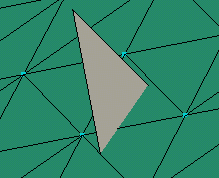
- Use
 () to clean up any disconnected nodes that may have been created during the cleanup operations.
If a few overlapping and intersecting elements remain, use commands to fix them manually.
Note: Another common way to fix overlapping elements is to merge nodes. This is also accomplished using the Mesh Repair panel. Select the node(s) you want to merge to and then the node(s) you want to be merged.