Autodesk Nastran In-CAD 2016 Subscription Advantage Pack (SAP) (September 2015)
To remove/uninstall Autodesk Nastran In-CAD 2016 SAP, use the Autodesk Uninstall Tool or Control Panel/Uninstall Programs, as described below.
-
Through Autodesk Uninstall Tool
- On Windows 7 OS, click the Start button.
- Click on All Programs.
- Expand Autodesk and click on Uninstall Tool utility.
- Check the box next to
Autodesk Nastran In-CAD 2016 SAP.
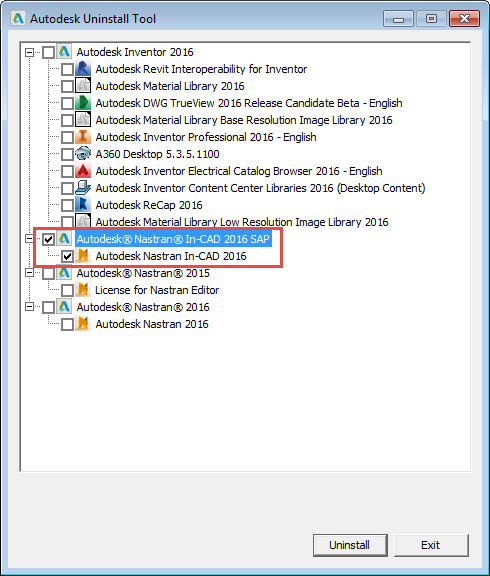
- Click on the Uninstall button.
- Click Exit to close the uninstall tool.
- On Windows 8, 8.1, and 10 OS, search for Uninstall Tool, then follow steps 4 and 5 from above.
-
Through Control Panel
- Go to Control Panel and select the Autodesk Nastran In-CAD 2016 component.
- Click on the
Uninstall button.

Autodesk Nastran In-CAD 2016 (April 2015)
To remove/uninstall Autodesk Nastran In-CAD 2016, use the Autodesk Uninstall Tool or Control Panel/Uninstall Programs, as described below.
-
Through Autodesk Uninstall Tool
- On Windows 7 OS, click the Start button.
- Click on All Programs.
- Expand Autodesk and click on Uninstall Tool utility.
- Check the box next to
Autodesk Nastran In-CAD 2016.
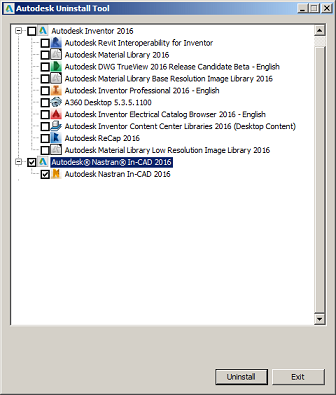
- Click on the Uninstall button.
- Click Exit to close the uninstall tool.
- On Windows 8 and 8.1 OS, search for Uninstall Tool, then follow steps 4 and 5 from above.
-
Through Control Panel
- Go to Control Panel and select the Autodesk Nastran In-CAD 2016 component.
- Click on the
Uninstall button.
