- In the tree view, right-click on Physical Properties and choose New.
- Rename the property to Beam Property.
- Select Line Elements from the Type drop-down menu.
- Select Beam from the Line Element Type drop-down menu.
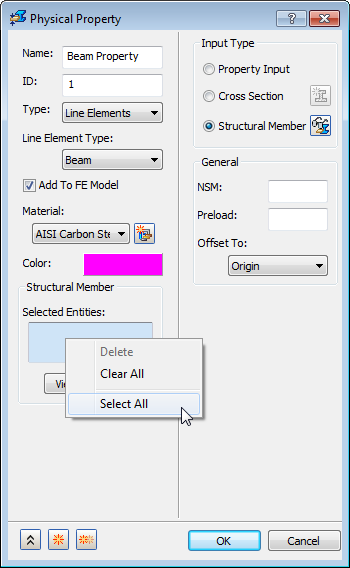
- Select Structural Member radio button from the Input Type group box.
- To select all the structural members in the
Selected Structural Member selection box, right-click inside the selection box and click
Select All. This can be done by using either a box select, or by individually clicking on each structural member in the model.
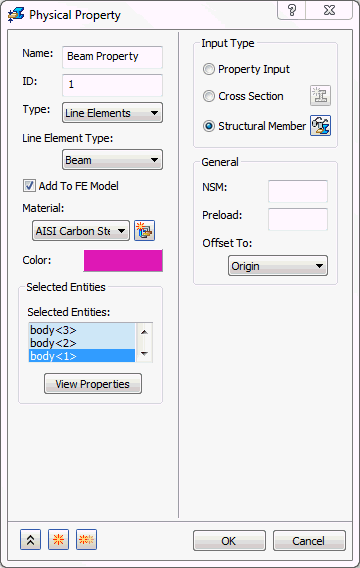
- To view the properties of the structural member, click on View Properties button.
- Click
OK.
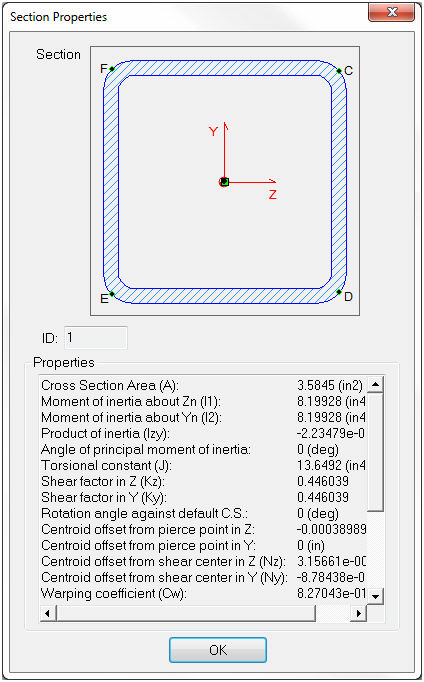
 This will create a mesh with the cross sectional properties for each one of the structural members in the model even though they are all combined into one physical property.
- Click OK to create the physical property.