- Right-click on Surface Contacts in the tree view and choose New.
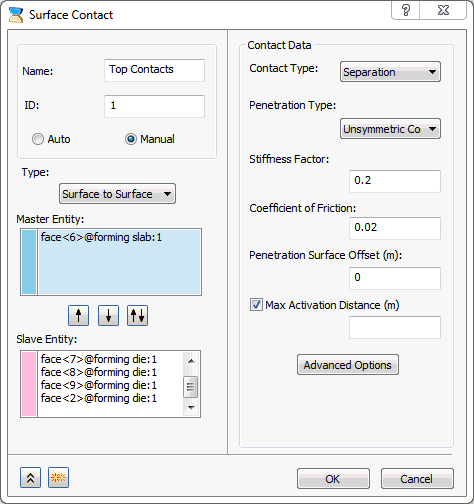
- Change the Name to Top Contacts.
- Select Manual radio button.
- Pick the top surface of the sheet slab as the Master Entity surface.
- For the slave surface, select the contacting face of the die, as shown in the image below.
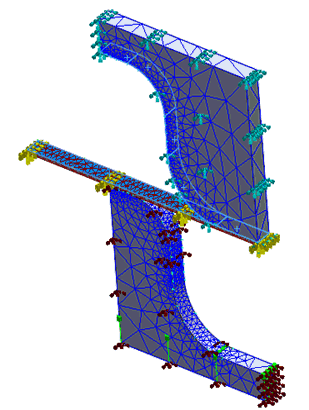
- Make sure Add to FE Model is checked.
- Enter
0.2 for the
Stiffness Factor, and
0.02 for the
Coefficient of Friction.
- Click on
 Duplicate button and change the
Name to
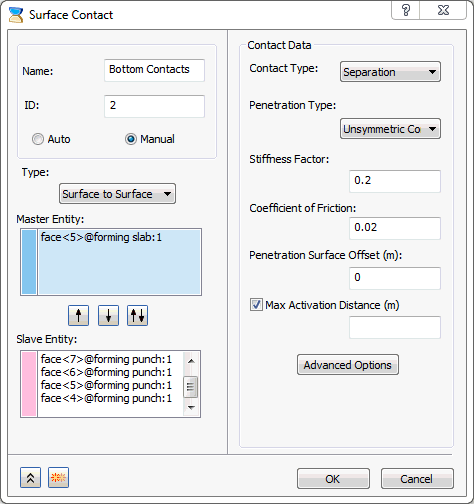
Bottom Contacts.
Duplicate button and change the
Name to
Bottom Contacts.
- Clear all the entities and re-select the
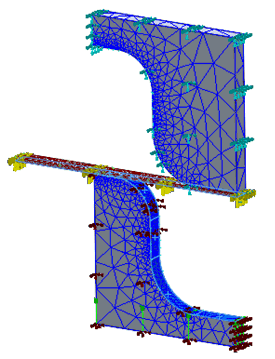
Master Entity as the bottom surfaces of the sheet slab and Slave
Entity all the contacting faces of punch model, as shown in the image below.
- Click OK to create the surface contacts.