Modal frequency response solutions need modal information to solve the equations of motion.
- In the tree view, right-click on Modal Setup 1 and select Edit.
- Type 40 for Number of Modes.
- Click OK to accept the changes.
 You defined 40 modes in order to achieve enough modal information to get a good answer. This was found by running a normal modes analysis and looking at the Percent Modal Mass table found in the Autodesk Nastran Output file (*.OUT). With 40 modes, the table looked as shown below.
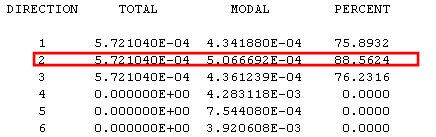
Notice that there is 88% in the 2 direction. We want more than 80% in this direction since this is the direction we are giving base excitation to. You can view this output (*.OUT) file with any text editor, such as Notepad.