- In the tree view, right-click on Analysis 1 and click Edit.
- Input Bracket Analysis in the Name field and Modal Frequency Response in the Title field.
- Change the drop-down box for Type to Modal Frequency Response.
- Make sure that the
Nodal Output Control and
Elemental Output Control are set as shown in the picture below. Also,
Displacement and
Acceleration should be checked, while
Stress should be unchecked.
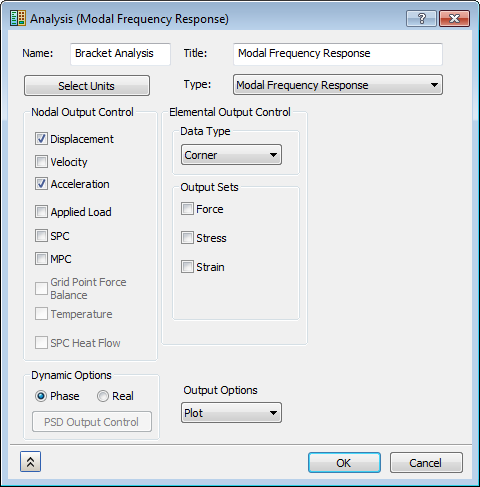
- Click OK.
 Dynamic analyses produce a lot of output and therefore, only output that is needed should be requested. It is quite easy for a result file to go well over the gigabyte size with dynamic analyses such as frequency response.
These settings are not critical to the analysis, but are just measures to reduce the time of the analysis as well as only give you output that the tutorial will focus on.