To setup Rayleigh Damping for a dynamic analysis, in the Autodesk Nastran In-CAD tree, right-click on Dampings and select New. Then select the Rayleigh Damping checkbox.
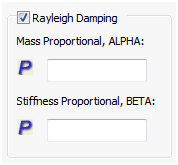
- Mass Proportional, ALPHA: Applies modal based damping to dynamic analysis.
- Stiffness Proportional, BETA: Applies structural based damping to dynamic analysis.