Sets values for pipe sizes, pipe specs, services, instrument types, and other P&ID data fields.
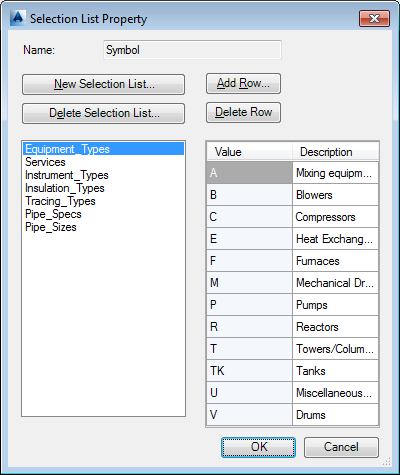
These values are displayed as drop-down lists, where users choose a predefined value.
Name
Displays the name of the property that the predefined select list is being edited for.
- New Selection List
-
Displays the Add Selection List dialog box, where you enter a new selection list name.
- Delete Selection List
-
Deletes a selected selection list.
- Add Row
-
Displays the Add Row dialog box, where you enter a value and description for the new entry in the selection list.
- Delete Row
-
Deletes the selected row from the Selection List Details pane.
- Selection List
-
Sets a data field category. Default categories include Pipe_Sizes, Pipe_Specs, Tracing_Types, Insulation_Types, Instrument_Types, Services, and Equipment_Types. Categories and values are often determined by the industry standard used (for example: PIP, ISO, or ISA).
- Selection List Details
-
Sets a value and description for a selected or added category.