You can upload a Revit model on A360 to make it available to other users.
When you upload a model on A360, the default 3D view and all 2D sheets are uploaded by default. Use the Views for A360 tool when you want to select and save one or more sets of views and sheets to upload on A360.
- Open a Revit model.
- Select views to publish on A360.
- Save the model to your local workstation.
- On A360, open the project you want to upload the model to.
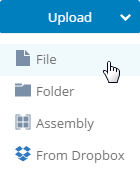
- Click Upload and select File.
- Browse to the location on your local workstation where you saved the
Revit model and click Open.
You will receive a notification when the upload is complete.