Autodesk Screencast is a free service that allows anyone to capture, share, and learn from software workflows.
- A recording application
- An upload service that processes recordings and metadata
- A website that displays the recordings as interactive video tutorials
Autodesk applications like Fusion 360, AutoCAD, Revit, and Inventor already support Screencast. Many other major software developers are integrating Screencast support into their products or plan to do so.
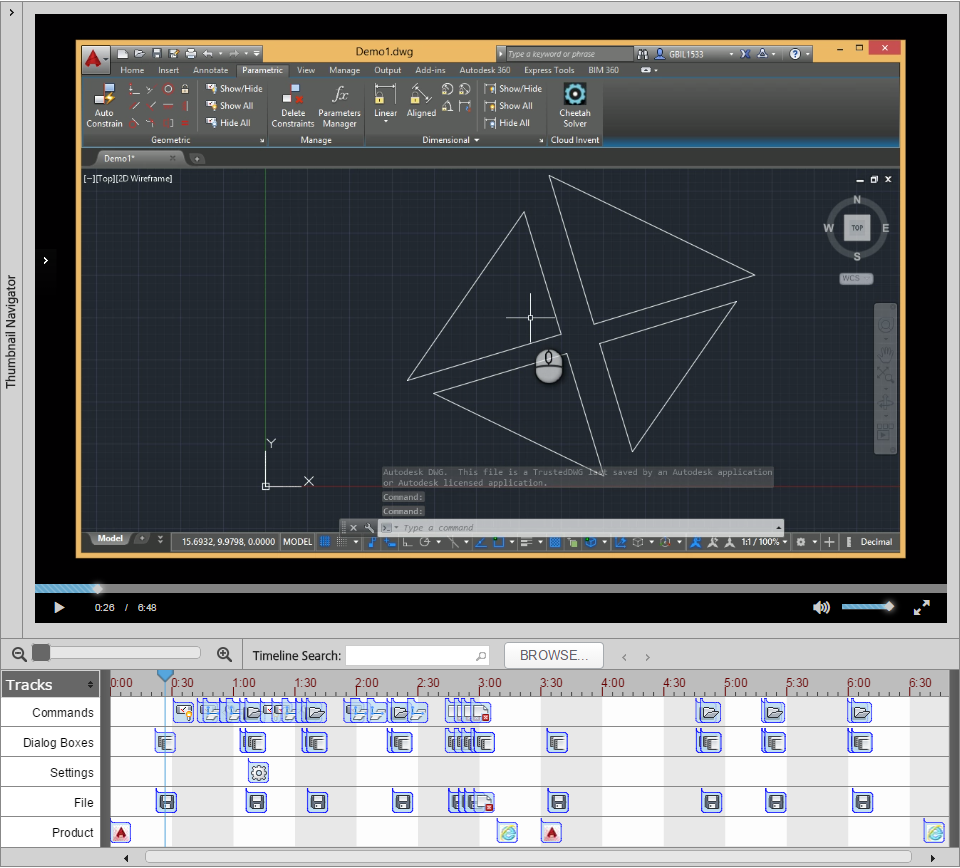
Screencast lets users record video and audio for any type of desktop software application, SaaS, or web browser. All keyboard and mouse button presses and motions are etched into the video, so that data is available for nearly all Screencast videos. Screencast also records product data; when users switch between applications, the event is recorded in the Product timeline.
For other Screencast timeline features to be available, the application must be instrumented with the Screencast API. The Screencast API is only available for Windows applications.
This screenshot shows the primary tracks in the Screencast timeline. You can find this Screencast recording on the Screencast website under the title Robust Constrained Models in AutoCAD.