Determine whether Inventor, AutoCAD, and Revit files are opened by the latest version, the last run version, or the version of the CAD Application that saved the file.
For example, if AutoCAD 2015 and AutoCAD 2016 are both installed on a machine, and you want files that were saved in AutoCAD 2015 to always open with AutoCAD 2016, you can configure Vault to always launch AutoCAD 2016 for all .dwg and .dxf files.
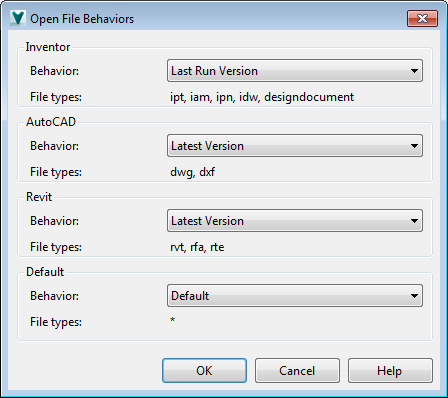
Configure Open File Behaviors
- In the Vault Client, select .
- Next to Open file behavior settings click Settings.
- On the Open File Behaviors dialog, configure your open preferences for each CAD application. Note: Not all options are available for each CAD application.
- Last Run Version– Opens the CAD file with the last used version of the CAD application.
- Latest Version–Opens the CAD file with the newest version of the CAD application.
- Saved by Version–Opens the CAD file with the version of the CAD application that was last used to save the file.
- Default–Uses the current settings in Vault for opening a specified CAD file.
- Inventor files are opened with the default application specified by Windows.
For example, if you have installed another application capable of opening Inventor files and configured Windows to use that application as the default handler, by default Vault uses that same application to open Inventor files.
- AutoCAD files are opened with the latest version of AutoCAD.
- Revit files are opened with the latest version of Revit.
- Inventor files are opened with the default application specified by Windows.
- Click OK when you are finished to save your changes.