
Version 3.12
Version 3.12.1.8
January 10, 2014
Copyright 1986, 2015 NVIDIA ARC GmbH. All rights reserved.
This document is a short tutorial about two new features available in mental ray 3.11, called light importance sampling and multiple importance sampling.
The scene provided as an example is called "scene.mi" (there is actually a second .mi file, loaded from the first, that only contains the objects definitions) and can be rendered directly, provided the user has the public "base" shaders installed. It consists of the following elements:
This lighting scenario is quite hard for classical mental ray light sampling, which is uniform: the light source is very wide (it encompasses the whole scene) and it has a texture attached that has a high dynamic range and is a pretty high frequency image (it's the "sky_beach.hdr" image file, that is a panoramic view of a beach and a sunny sky. It is an edited version of an HDR texture courtesy of the www.openfootage.net website). A render with 2000 samples for the light (200 samples in reflections) yields a pretty noisy image:
Even raising the number of samples to 10000 (and 1000 in reflections) doesn't solve the noise issue completely, as it can be seen in the following image, and most importantly it takes quite a long time to render:

In the given example scene, try setting to on the value of the "light importance sampling" string option in the options block at the beginning of the file, lower the number of samples for the light (look for the definition of "sky_dome_physical_light") and render the scene again: you will now see a much less noisy image (compared to the first render) and rendered in a fraction of the time (this is due to the fact that with less noise there is also less oversampling for anti-aliasing). The rendered image should look like the following (this has been rendered with 500 samples for the light, 64 in reflections):

The image above is a significant improvement over the first render produced with uniform sampling of the light, but it is still not perfect. The yellow sphere still presents some noisy pixels, and the reflection of the sky is just barely discernible. Moreover, the blue sphere is too noisy. One way of solving these problems is to raise the number of samples for the light, but in this case it is also possible to use multiple importance sampling, to exploit the fact that the materials are BSDFs.
Multiple importance sampling (abbreviated in MIS from now on) is a way of combining together different sampling techniques. Some of the samples are generated by sampling the light, and some are generated by sampling the BSDFs; these samples are then combined to produce the final result. This approach can obviously be used only when the materials have a BSDF attached in the BSDF slot of the material definition, like in this example (as it was mentioned above, the materials are actually built-in BSDFs). MIS is enabled by setting to on the "multiple importance sampling" string option (or by specifying "-mis on" in the command line options), if you do that in the scene (leaving IS enabled) and render it again you should get the following image:
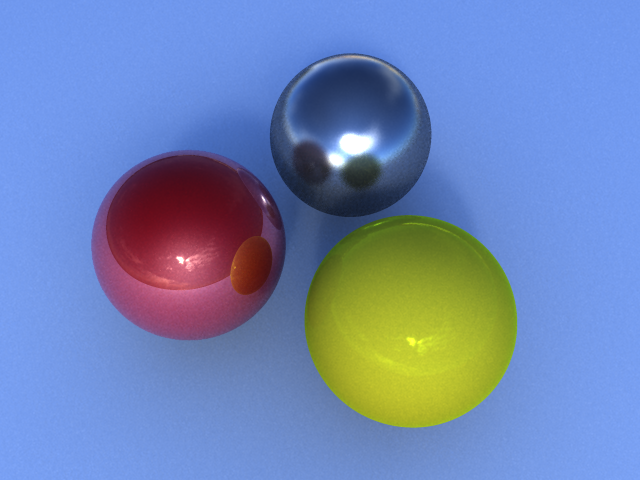
MIS is a mechanism that combines different sampling techniques, so it can be used only when there are materials that have BSDFs attached; when a material has no BSDF, mental ray defaults to light sampling only (whether with or without IS). In the last two renders, you can see that the ground plane looks identical: this is because it has a Lambertian base shader with no BSDF attached, and mental ray doesn't use MIS for it (but it uses light IS, that's why it looks much less noisy than in the first renders done with uniform light sampling).
Copyright © 1986, 2015 NVIDIA ARC GmbH. All rights reserved.