The concept of namespaces was introduced to prevent applications running in one drawing window from unintentionally affecting applications running in other windows. A namespace is a LISP environment containing a set of symbols (for example, variables and functions). Each open AutoCAD drawing document has its own namespace. Variables and functions defined in one document namespace are isolated from variables and functions defined in other namespaces.
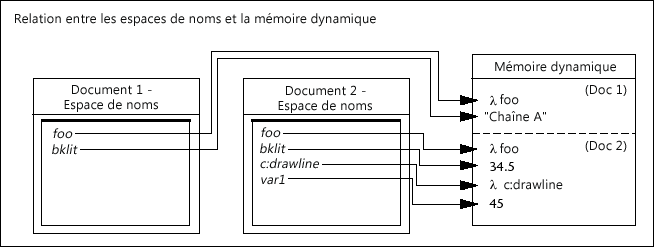
You can see how this works by trying a simple example.
To see the effect of multiple namespaces
- Open two new drawings in AutoCAD.
- Click View tab
 User Interface panel Tile Vertically. You should see two open document windows side by side within the main AutoCAD window:
 The document's title bar indicates which window is currently active.
- At the Command prompt, enter (setq draw1foo "I am drawing 1") and press Enter.
This sets the draw1foo variable to a string.
- Activate the second drawing (click in the window's title bar).
- See if draw1foo contains the value you just set for it by entering !draw1foo and press Enter at the Command prompt.
!draw1foo
nil
The variable is nil because it has not been set in this document's namespace; you set it in the namespace belonging to Drawing1.dwg.
- At the Command prompt, enter (setq draw2foo "I too am a drawing, but number 2") and press Enter.
This sets the draw2foo variable to a string.
- Activate the other drawing that is open.
- Test the values of variables draw1foo and draw2foo:
!draw1foo
"I am drawing 1"

!draw2foo
nil
The draw1foo variable contains the value you set for it, but draw2foo is nil because you did not set it to a value in the current namespace; you set a different variable of the same name in the second drawing's namespace.
VLISP provides ways for you to share variables between namespaces, but you must take explicit action to do so. (See About Sharing Data Between Namespaces [AutoLISP].)
Like variables, functions defined in an AutoLISP file are known only to the document that was active when the file was loaded. The functions in the file are loaded in the current document's namespace and are known only to that document.
To see how functions are affected by multiple namespaces
- Load a LISP file from either the AutoCAD Command prompt or the VLISP Console prompt. For example:
(load "yinyang.lsp")
- Invoke the function.
- Open a second drawing window.
- With the second drawing window active, try invoking the function again. The response will be an error message saying the function is not defined.
You can use the vl-load-all function to load the contents of an AutoLISP file into all AutoCAD drawing documents. For example, the following command causes the contents of the yinyang.lsp file to be loaded into all open documents, and into any documents opened later in the AutoCAD session:
(vl-load-all "yinyang.lsp")
The vl-load-all function is useful for testing new functions in multiple documents, but in general you should use acaddoc.lsp to load files that are needed in every AutoCAD document.