Learn how to define new load combinations and how to define load cases for these combinations manually.
- Continue working in your project, or open the project Plate_Applied_Loads.rtd.
Note: The Tutorial files are located in C:\ProgramData\Autodesk\Examples\Tutorials.
- Click Loads
 Manual Combinations.
The Combination Definition/Modification dialog opens.
- Keep the default values for the Combination number, Combination type, and Combination name.
- Click OK.
The Combinations dialog opens.
- Select live in the Nature list to display live loads only.
- Click
 to transfer all the live load cases from the left panel to the list of cases in combination in the right panel.
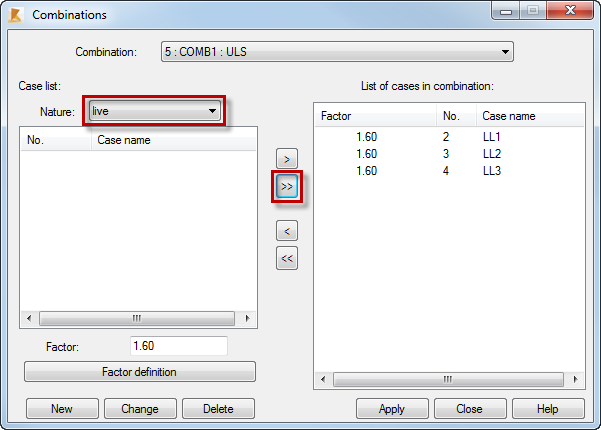
- Click Apply.
- Click New.
The Combination Definition/Modification dialog opens.
- Select SLS in the Combination type list.
- Keep the default values for the Combination number, and Combination name.
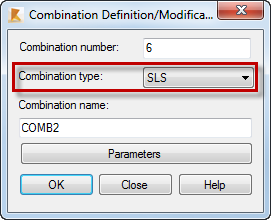
- Click OK.
The Combinations dialog opens.
- Click to transfer all live load cases from the left panel to the list of cases in combination in the right panel.
- Click Apply, and close the Combinations dialog.
The load combinations COMB1 and COMB2 are added to the list of defined load cases.
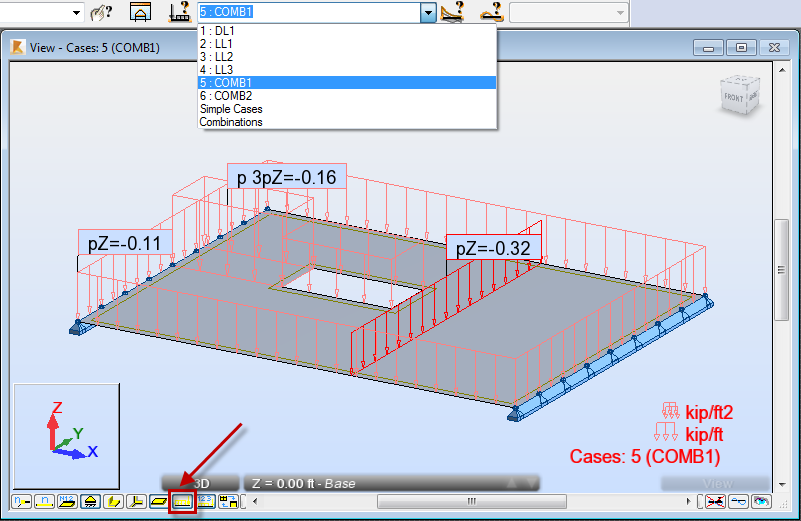 Tip: Click
 (Load symbols) at the bottom of the drawing area to display the symbols of loads values.
 - Save the project as Plate_Combinations.rtd.
Click here to go to the Summary.