ダイアログ コントロール言語(DCL)ファイルは、ダイアログ ボックスとその要素を定義する単純な ASCII ファイルです。
ボタンや編集ボックスなどのダイアログ ボックスの要素を、タイルといいます。各タイルのサイズと機能は、タイルの属性でコントロールします。ダイアログ ボックスのサイズと各部のレイアウトは、最小限の位置情報を使用して自動的に設定されます。
ダイアログ ボックスの定義は、ダイアログ タイルを使用することから始まります。DCL ファイル内のダイアログ ボックスの定義それぞれの前に一意の名前を付ける必要があります。この名前は、このダイアログ ボックスを表示することになる AutoLISP プログラムからこのダイアログ ボックスを参照するために使用されます。ダイアログ タイルのラベル属性は、ダイアログ ボックスのタイトル バーに表示される文字を設定するために使用することができます。
次に、名前が minimaldcl であるダイアログ定義の例を示します。この例は、ダイアログ ボックスにタイトルを割り当て、1 つの[OK]ボタンを表示します。
minimaldcl : dialog
{
  label="Minimal Example";
  ok_only;
}
基本的なダイアログ ボックスを定義したら、ユーザに情報を提供するまたはアクションを開始できるようにするコントロールを表すタイルを追加することができます。前の例の ok_only タイルは、OK というラベル付きのボタン用の定義済みタイル定義です。タイルの外観やコールバック アクションは、属性と属性値のペアを使用して定義します。次の図に、Garden Path Tile Specification というタイトルで DCL ファイルに定義されたダイアログ ボックスの例を示します。
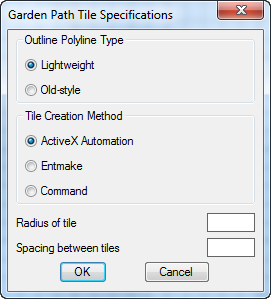
Garden Path Tile Specification ダイアログ ボックスのダイアログとダイアログのタイルとその属性を含む DCL ファイルの内容を示します。
gp_mainDialog : dialog {
  label = "Garden Path Tile Specifications";
  : boxed_radio_column {     // defines the radio button areas
    label = "Outline Polyline Type";
    : radio_button {         // defines the Lightweight radio button
      label = "&Lightweight";
      key = "gp_lw";
      value = "1";
    }
    : radio_button {         // defines the old-style polyline radio button
      label = "&Old-style";
      key = "gp_hw";
    }
  }

  : boxed_radio_column {     // defines the radio button areas
    label = "Tile Creation Method";
    : radio_button {         // defines the ActiveX radio button
      label = "&ActiveX Automation";
      key = "gp_actx";
      value = "1";
    }
    : radio_button {         // defines the (entmake) radio button
      label = "&Entmake";
      key = "gp_emake";
    }
    : radio_button {         // defines the (command) radio button
      label = "&Command";
      key = "gp_cmd";
    }
  }

  : edit_box {               // defines the Radius of Tile edit box
    label = "&Radius of tile";
    key = "gp_trad";
    edit_width = 6;
  }
  : edit_box {               // defines the Spacing Between Tiles edit box
    label = "&Spacing between tiles";
    key = "gp_spac";
    edit_width = 6;
  }
  : row {                    // defines the OK/Cancel button row
    : spacer { width = 1; }
    : button {               // defines the OK button
      label = "OK";
      is_default = true;
      key = "accept";
      width = 8;
      fixed_width = true;
   }
   : button {                // defines the Cancel button
     label = "Cancel";
     is_cancel = true;
     key = "cancel";
     width = 8;
     fixed_width = true;
   }
   : spacer { width = 1;}
  }
}
コメント
DCL ファイルでは、2 つのスラッシュ( // )以降はコメントとみなされ、// から行の終わりまでの文字は無視されます。DCL では、C 言語形式のコメントも認められています。その形式は /* comment text */ です。左側の /* と右側の */ は同じ行になくてもかまいません。