歩道を描く手順が完成したので、次のステップでは、それぞれの行内にタイルを描く方法を明らかにします。次の図に、2 つの場合を示します。一方は歩道の中心からのオフセットが 0.0 で、もう一方はオフセットがゼロではありません。図を見ながら、次の疑似コードを読んでください。
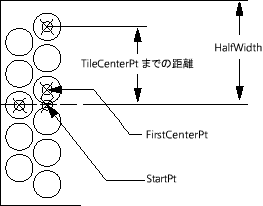
Set up variables for StartPoint, angp90, angm90, and so on.

Set the variable FirstCenterPoint to the StartPoint + offset amount
    (which may be 0.0).

Set the initial value of TileCenterPt to FirstCenterPoint.

(Comment: Begin by drawing the circles in the angp90 direction.)
While the distance from the StartPoint to the TileCenterPt is less than the HalfWidth:
    Draw a circle (adding to the accumulating list of circles).
    Set TileCenterPt to the next tile space increment in the angp90
    direction.
End While

Reset the TileCenterPoint to the FirstCenterPoint + the tile space increment at angm90.

While the distance from the StartPoint to the TileCenterPt is less than the HalfWidth:
    Draw a circle (adding to the accumulating list of circles).
    Set TileCenterPt to the next tile space increment in the angm90
    direction.
End While

Return the list of circles.