ある色で塗り潰した三角形および四辺形領域を作成できます。塗り潰し領域を作成するときは、システム変数 FILLMODE をオフに設定してパフォーマンスを向上させ、塗り潰し領域を作成したら再びオンに戻します。
四辺形塗り潰し領域を作成する場合、第 3 の点と第 4 の点のシーケンスがその形状を決定します。次の図を比較してください。
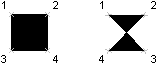
最初の 2 点は、多角形の 1 辺を定義します。第 3 の点は、第 2 の点の対角線上の向かい合った点として定義されます。第 4 の点が第 3 の点と等しく設定されると、塗り潰し三角形が作成されます。
塗り潰しオブジェクトを作成する
次の例は、座標(0, 0, 0)、(5, 0, 0)、(5, 8, 0)、(0, 8, 0)を使って、モデル空間に四辺形ソリッド(蝶ネクタイ)を作成します。また、座標(10, 0, 0)、(15, 0, 0)、(10, 8, 0)、(15, 8, 0)を使用して、長方形内に四辺形ソリッドを作成します。
VB.NET
Imports Autodesk.AutoCAD.Runtime
Imports Autodesk.AutoCAD.ApplicationServices
Imports Autodesk.AutoCAD.DatabaseServices
Imports Autodesk.AutoCAD.Geometry

<CommandMethod("Add2DSolid")> _
Public Sub Add2DSolid()
    '' Get the current document and database
    Dim acDoc As Document = Application.DocumentManager.MdiActiveDocument
    Dim acCurDb As Database = acDoc.Database

    '' Start a transaction
    Using acTrans As Transaction = acCurDb.TransactionManager.StartTransaction()

        '' Open the Block table for read
        Dim acBlkTbl As BlockTable
        acBlkTbl = acTrans.GetObject(acCurDb.BlockTableId, OpenMode.ForRead)

        '' Open the Block table record Model space for write
        Dim acBlkTblRec As BlockTableRecord
        acBlkTblRec = acTrans.GetObject(acBlkTbl(BlockTableRecord.ModelSpace), _
                                        OpenMode.ForWrite)

        '' Create a quadrilateral (bow-tie) solid in Model space
        Using ac2DSolidBow As Solid = New Solid(New Point3d(0, 0, 0), _
                                                New Point3d(5, 0, 0), _
                                                New Point3d(5, 8, 0), _
                                                New Point3d(0, 8, 0))

            '' Add the new object to the block table record and the transaction
            acBlkTblRec.AppendEntity(ac2DSolidBow)
            acTrans.AddNewlyCreatedDBObject(ac2DSolidBow, True)
        End Using

        '' Create a quadrilateral (square) solid in Model space
        Using ac2DSolidSqr As Solid = New Solid(New Point3d(10, 0, 0), _
                                                New Point3d(15, 0, 0), _
                                                New Point3d(10, 8, 0), _
                                                New Point3d(15, 8, 0))

            '' Add the new object to the block table record and the transaction
            acBlkTblRec.AppendEntity(ac2DSolidSqr)
            acTrans.AddNewlyCreatedDBObject(ac2DSolidSqr, True)
        End Using

        '' Save the new object to the database
        acTrans.Commit()
    End Using
End Sub
C#
using Autodesk.AutoCAD.Runtime;
using Autodesk.AutoCAD.ApplicationServices;
using Autodesk.AutoCAD.DatabaseServices;
using Autodesk.AutoCAD.Geometry;

[CommandMethod("Add2DSolid")]
public static void Add2DSolid()
{
    // Get the current document and database
    Document acDoc = Application.DocumentManager.MdiActiveDocument;
    Database acCurDb = acDoc.Database;

    // Start a transaction
    using (Transaction acTrans = acCurDb.TransactionManager.StartTransaction())
    {
        // Open the Block table for read
        BlockTable acBlkTbl;
        acBlkTbl = acTrans.GetObject(acCurDb.BlockTableId,
                                        OpenMode.ForRead) as BlockTable;

        // Open the Block table record Model space for write
        BlockTableRecord acBlkTblRec;
        acBlkTblRec = acTrans.GetObject(acBlkTbl[BlockTableRecord.ModelSpace],
                                        OpenMode.ForWrite) as BlockTableRecord;

        // Create a quadrilateral (bow-tie) solid in Model space
        using (Solid ac2DSolidBow = new Solid(new Point3d(0, 0, 0),
                                        new Point3d(5, 0, 0),
                                        new Point3d(5, 8, 0),
                                        new Point3d(0, 8, 0)))
        {
            // Add the new object to the block table record and the transaction
            acBlkTblRec.AppendEntity(ac2DSolidBow);
            acTrans.AddNewlyCreatedDBObject(ac2DSolidBow, true);
        }

        // Create a quadrilateral (square) solid in Model space
        using (Solid ac2DSolidSqr = new Solid(new Point3d(10, 0, 0),
                                        new Point3d(15, 0, 0),
                                        new Point3d(10, 8, 0),
                                        new Point3d(15, 8, 0)))
        {
            // Add the new object to the block table record and the transaction
            acBlkTblRec.AppendEntity(ac2DSolidSqr);
            acTrans.AddNewlyCreatedDBObject(ac2DSolidSqr, true);
        }

        // Save the new object to the database
        acTrans.Commit();
    }
}
VBA/ActiveX コード リファレンス
Sub Add2DSolid()
    Dim solidObj As AcadSolid
    Dim point1(0 To 2) As Double
    Dim point2(0 To 2) As Double
    Dim point3(0 To 2) As Double
    Dim point4(0 To 2) As Double

    ' Define the solid
    point1(0) = 0#: point1(1) = 0#: point1(2) = 0#
    point2(0) = 5#: point2(1) = 0#: point2(2) = 0#
    point3(0) = 5#: point3(1) = 8#: point3(2) = 0#
    point4(0) = 0#: point4(1) = 8#: point4(2) = 0#
    ' Create the solid object in model space
    Set solidObj = ThisDrawing.ModelSpace.AddSolid _
                                    (point1, point2, point3, point4)

    ' Define the solid
    point1(0) = 10#: point1(1) = 0#: point1(2) = 0#
    point2(0) = 15#: point2(1) = 0#: point2(2) = 0#
    point3(0) = 10#: point3(1) = 8#: point3(2) = 0#
    point4(0) = 15#: point4(1) = 8#: point4(2) = 0#
    ' Create the solid object in model space
    Set solidObj = ThisDrawing.ModelSpace.AddSolid _
                                    (point1, point2, point3, point4)

    ZoomAll
End Sub