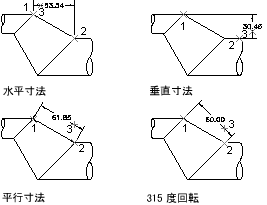
長さ寸法は、平行または回転のいずれかにすることができます。平行寸法では、寸法補助線の起点間を結ぶ線分と平行に寸法線が描画されます。回転寸法では、寸法補助線の起点と一定の角度に寸法線が描画されます。
長さ寸法を記入するには、AlignedDimension および RotatedDimension オブジェクトのインスタンスを作成します。長さ寸法のインスタンスを作成した後、寸法値、寸法値の角度、寸法線の角度を変更することができます。次の図では、長さ寸法の種類と、寸法補助線の起点の配置が、寸法線の角度と寸法値にどのように影響するのかを示します。
AlignedDimension オブジェクトのインスタンスを作成するときは、寸法補助線の起点、寸法線の位置、寸法値、適用する寸法スタイルを指定できます。AlignedDimension オブジェクトのコンストラクタにパラメータを何も渡さない場合は、一連の既定プロパティ値がオブジェクトに割り当てられます。
RotatedDimension オブジェクトのコンストラクタは、AlignedDimension オブジェクトのコンストラクタと同じオプションを提供しますが、1 つ例外があります。RotatedDimension オブジェクトのコンストラクタは、寸法線を回転する角度を指定する追加のパラメータを受け取ります。
寸法線折り曲げ
長さ寸法の折り曲げは、プロパティのセットでは追加されず、拡張データ(Xdata)を使用します。寸法線折り曲げを行うアプリケーションの名前は ACAD_DSTYLE_DIMJAG_POSITION です。次に、長さ寸法に追加する必要のある Xdata 構造の例を示します。
VB.NET
'' Open the Registered Application table for read
Dim acRegAppTbl As RegAppTable
acRegAppTbl = <transaction>.GetObject(<current_database>.RegAppTableId, _
                                      OpenMode.ForRead)

'' Check to see if the app "ACAD_DSTYLE_DIMJAG_POSITION" is
'' registered and if not add it to the RegApp table
If acRegAppTbl.Has("ACAD_DSTYLE_DIMJAG_POSITION") = False Then
    Using acRegAppTblRec As RegAppTableRecord = New RegAppTableRecord()

        acRegAppTblRec.Name = "ACAD_DSTYLE_DIMJAG_POSITION"

        acRegAppTbl.UpgradeOpen()

        acRegAppTbl.Add(acRegAppTblRec)
        <transaction>.AddNewlyCreatedDBObject(acRegAppTblRec, True)
    End Using
End If

'' Create a result buffer to define the Xdata
Dim acResBuf As ResultBuffer = New ResultBuffer()
acResBuf.Add(New TypedValue(DxfCode.ExtendedDataRegAppName, _
                                    "ACAD_DSTYLE_DIMJAG_POSITION"))
acResBuf.Add(New TypedValue(DxfCode.ExtendedDataInteger16, 387))
acResBuf.Add(New TypedValue(DxfCode.ExtendedDataInteger16, 3))
acResBuf.Add(New TypedValue(DxfCode.ExtendedDataInteger16, 389))
acResBuf.Add(New TypedValue(DxfCode.ExtendedDataXCoordinate, _
                                    New Point3d(-1.26985, 3.91514, 0)))

'' Attach the Xdata to the dimension
<dimension_object>.XData = acResBuf
C#
// Open the Registered Application table for read
RegAppTable acRegAppTbl;
acRegAppTbl = <transaction>.GetObject(<current_database>.RegAppTableId,
                                      OpenMode.ForRead) as RegAppTable;

// Check to see if the app "ACAD_DSTYLE_DIMJAG_POSITION" is
// registered and if not add it to the RegApp table
if (acRegAppTbl.Has("ACAD_DSTYLE_DIMJAG_POSITION") == false)
{
    using (RegAppTableRecord acRegAppTblRec = new RegAppTableRecord())
    {
        acRegAppTblRec.Name = "ACAD_DSTYLE_DIMJAG_POSITION";

        acRegAppTbl.UpgradeOpen();

        acRegAppTbl.Add(acRegAppTblRec);
        <transaction>.AddNewlyCreatedDBObject(acRegAppTblRec, true);
    }
}

// Create a result buffer to define the Xdata
ResultBuffer acResBuf = new ResultBuffer();
acResBuf.Add(new TypedValue((int)DxfCode.ExtendedDataRegAppName,
                                         "ACAD_DSTYLE_DIMJAG_POSITION"));
acResBuf.Add(new TypedValue((int)DxfCode.ExtendedDataInteger16, 387));
acResBuf.Add(new TypedValue((int)DxfCode.ExtendedDataInteger16, 3));
acResBuf.Add(new TypedValue((int)DxfCode.ExtendedDataInteger16, 389));
acResBuf.Add(new TypedValue((int)DxfCode.ExtendedDataXCoordinate,
                                         new Point3d(-1.26985, 3.91514, 0)));

// Attach the Xdata to the dimension
<dimension_object>.XData = acResBuf;
VBA/ActiveX コード リファレンス
Dim DataType(0 To 4) As Integer
Dim Data(0 To 4) As Variant
Dim jogPoint(0 To 2) As Double

DataType(0) = 1001: Data(0) = "ACAD_DSTYLE_DIMJAG_POSITION"
DataType(1) = 1070: Data(1) = 387
DataType(2) = 1070: Data(2) = 3
DataType(3) = 1070: Data(3) = 389

jogPoint(0) = -1.26985: jogPoint(1) = 3.91514: jogPoint(2) = 0#
DataType(4) = 1010: Data(4) = jogPoint

' Attach the xdata to the dimension
<dimension_object>.SetXData DataType, Data
回転長さ寸法を記入する
次の例では、モデル空間に回転寸法を記入します。
VB.NET
Imports Autodesk.AutoCAD.Runtime
Imports Autodesk.AutoCAD.ApplicationServices
Imports Autodesk.AutoCAD.DatabaseServices
Imports Autodesk.AutoCAD.Geometry

<CommandMethod("CreateRotatedDimension")> _
Public Sub CreateRotatedDimension()
    '' Get the current database
    Dim acDoc As Document = Application.DocumentManager.MdiActiveDocument
    Dim acCurDb As Database = acDoc.Database

    '' Start a transaction
    Using acTrans As Transaction = acCurDb.TransactionManager.StartTransaction()

        '' Open the Block table for read
        Dim acBlkTbl As BlockTable
        acBlkTbl = acTrans.GetObject(acCurDb.BlockTableId, _
                                     OpenMode.ForRead)

        '' Open the Block table record Model space for write
        Dim acBlkTblRec As BlockTableRecord
        acBlkTblRec = acTrans.GetObject(acBlkTbl(BlockTableRecord.ModelSpace), _
                                        OpenMode.ForWrite)

        '' Create the rotated dimension
        Using acRotDim As RotatedDimension = New RotatedDimension()
            acRotDim.XLine1Point = New Point3d(0, 0, 0)
            acRotDim.XLine2Point = New Point3d(6, 3, 0)
            acRotDim.Rotation = 0.707
            acRotDim.DimLinePoint = New Point3d(0, 5, 0)
            acRotDim.DimensionStyle = acCurDb.Dimstyle

            '' Add the new object to Model space and the transaction
            acBlkTblRec.AppendEntity(acRotDim)
            acTrans.AddNewlyCreatedDBObject(acRotDim, True)
        End Using

        '' Commit the changes and dispose of the transaction
        acTrans.Commit()
    End Using
End Sub
C#
using Autodesk.AutoCAD.Runtime;
using Autodesk.AutoCAD.ApplicationServices;
using Autodesk.AutoCAD.DatabaseServices;
using Autodesk.AutoCAD.Geometry;

[CommandMethod("CreateRotatedDimension")]
public static void CreateRotatedDimension()
{
    // Get the current database
    Document acDoc = Application.DocumentManager.MdiActiveDocument;
    Database acCurDb = acDoc.Database;

    // Start a transaction
    using (Transaction acTrans = acCurDb.TransactionManager.StartTransaction())
    {
        // Open the Block table for read
        BlockTable acBlkTbl;
        acBlkTbl = acTrans.GetObject(acCurDb.BlockTableId,
                                        OpenMode.ForRead) as BlockTable;

        // Open the Block table record Model space for write
        BlockTableRecord acBlkTblRec;
        acBlkTblRec = acTrans.GetObject(acBlkTbl[BlockTableRecord.ModelSpace],
                                        OpenMode.ForWrite) as BlockTableRecord;

        // Create the rotated dimension
        using (RotatedDimension acRotDim = new RotatedDimension())
        {
            acRotDim.XLine1Point = new Point3d(0, 0, 0);
            acRotDim.XLine2Point = new Point3d(6, 3, 0);
            acRotDim.Rotation = 0.707;
            acRotDim.DimLinePoint = new Point3d(0, 5, 0);
            acRotDim.DimensionStyle = acCurDb.Dimstyle;

            // Add the new object to Model space and the transaction
            acBlkTblRec.AppendEntity(acRotDim);
            acTrans.AddNewlyCreatedDBObject(acRotDim, true);
        }

        // Commit the changes and dispose of the transaction
        acTrans.Commit();
    }
}
VBA/ActiveX コード リファレンス
Sub CreateRotatedDimension()
    Dim dimObj As AcadDimRotated
    Dim rotationAngle As Double
    Dim startExtPoint(0 To 2) As Double
    Dim endExtPoint(0 To 2) As Double
    Dim dimLinePoint(0 To 2) As Double

    ' Define the dimension
    rotationAngle = 0.707
    startExtPoint(0) = 0: startExtPoint(1) = 0: startExtPoint(2) = 0
    endExtPoint(0) = 6: endExtPoint(1) = 3: endExtPoint(2) = 0
    dimLinePoint(0) = 0: dimLinePoint(1) = 5: dimLinePoint(2) = 0

    ' Create the rotated dimension in Model space
    Set dimObj = ThisDrawing.ModelSpace. _
                                 AddDimRotated(startExtPoint, endExtPoint, _
                                               dimLinePoint, rotationAngle)
    ZoomAll
End Sub