径寸法は、円および円弧の半径または直径を示します。半径および直径の寸法は、RadialDimension および DiametricDimension オブジェクトのインスタンスを作成することによって記入されます。
各種の径寸法は、次の値を基に記入されます。円または円弧のサイズ、寸法値の位置、寸法記入システム変数 DIMUPT[寸法値位置指定]、DIMTOFL[寸法線内側記入]、DIMFIT[寸法値フィット]、DIMTIH[補助線内水平]、DIMTOH[補助線外水平]、DIMJUST[寸法値水平位置]、DIMTAD[寸法線上記入] (システム変数は、GetSystemVariable および SetSystemVariable メソッドを使用して、値の取得または設定が可能です)。
寸法線の角度が水平より 15 度を超えている場合、および寸法線が円または円弧の外側にある場合には、寸法値を水平に表示するため、ランディングまたはドッグレッグと呼ばれるフックラインが描かれます。フック ラインは、次の図に示すように寸法値の横または下に配置されます。
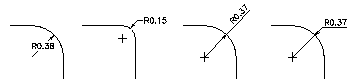
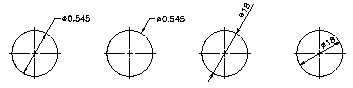
RadialDimension オブジェクトのインスタンスを作成するときは、中心点、弦ポイント、引出線の長さ、寸法値、適用する寸法スタイルを指定するオプションがあります。DiametricDimension オブジェクトの作成は、中心点と弦ポイントではなく、弦ポイントと遠方の弦ポイントを指定することを除いて、RadialDimension オブジェクトに似ています。
LeaderLength プロパティは、ChordPoint から注釈文字(フック ラインが必要ない場合はストップ)への距離を指定します。
径寸法を記入する
次の例は、モデル空間に径寸法を記入します。
VB.NET
Imports Autodesk.AutoCAD.Runtime
Imports Autodesk.AutoCAD.ApplicationServices
Imports Autodesk.AutoCAD.DatabaseServices
Imports Autodesk.AutoCAD.Geometry

<CommandMethod("CreateRadialDimension")> _
Public Sub CreateRadialDimension()
    '' Get the current database
    Dim acDoc As Document = Application.DocumentManager.MdiActiveDocument
    Dim acCurDb As Database = acDoc.Database

    '' Start a transaction
    Using acTrans As Transaction = acCurDb.TransactionManager.StartTransaction()

        '' Open the Block table for read
        Dim acBlkTbl As BlockTable
        acBlkTbl = acTrans.GetObject(acCurDb.BlockTableId, _
                                     OpenMode.ForRead)

        '' Open the Block table record Model space for write
        Dim acBlkTblRec As BlockTableRecord
        acBlkTblRec = acTrans.GetObject(acBlkTbl(BlockTableRecord.ModelSpace), _
                                        OpenMode.ForWrite)

        '' Create the radial dimension
        Using acRadDim As RadialDimension = New RadialDimension()
            acRadDim.Center = New Point3d(0, 0, 0)
            acRadDim.ChordPoint = New Point3d(5, 5, 0)
            acRadDim.LeaderLength = 5
            acRadDim.DimensionStyle = acCurDb.Dimstyle

            '' Add the new object to Model space and the transaction
            acBlkTblRec.AppendEntity(acRadDim)
            acTrans.AddNewlyCreatedDBObject(acRadDim, True)
        End Using

        '' Commit the changes and dispose of the transaction
        acTrans.Commit()
    End Using
End Sub
C#
using Autodesk.AutoCAD.Runtime;
using Autodesk.AutoCAD.ApplicationServices;
using Autodesk.AutoCAD.DatabaseServices;
using Autodesk.AutoCAD.Geometry;

[CommandMethod("CreateRadialDimension")]
public static void CreateRadialDimension()
{
    // Get the current database
    Document acDoc = Application.DocumentManager.MdiActiveDocument;
    Database acCurDb = acDoc.Database;

    // Start a transaction
    using (Transaction acTrans = acCurDb.TransactionManager.StartTransaction())
    {
        // Open the Block table for read
        BlockTable acBlkTbl;
        acBlkTbl = acTrans.GetObject(acCurDb.BlockTableId,
                                        OpenMode.ForRead) as BlockTable;

        // Open the Block table record Model space for write
        BlockTableRecord acBlkTblRec;
        acBlkTblRec = acTrans.GetObject(acBlkTbl[BlockTableRecord.ModelSpace],
                                        OpenMode.ForWrite) as BlockTableRecord;

        // Create the radial dimension
        using (RadialDimension acRadDim = new RadialDimension())
        {
            acRadDim.Center = new Point3d(0, 0, 0);
            acRadDim.ChordPoint = new Point3d(5, 5, 0);
            acRadDim.LeaderLength = 5;
            acRadDim.DimensionStyle = acCurDb.Dimstyle;

            // Add the new object to Model space and the transaction
            acBlkTblRec.AppendEntity(acRadDim);
            acTrans.AddNewlyCreatedDBObject(acRadDim, true);
        }

        // Commit the changes and dispose of the transaction
        acTrans.Commit();
    }
}
VBA/ActiveX コード リファレンス
Sub CreateRadialDimension()
    Dim dimObj As AcadDimRadial
    Dim center(0 To 2) As Double
    Dim chordPoint(0 To 2) As Double
    Dim leaderLen As Integer

    ' Define the dimension
    center(0) = 0
    center(1) = 0
    center(2) = 0
    chordPoint(0) = 5
    chordPoint(1) = 5
    chordPoint(2) = 0
    leaderLen = 5

    ' Create the radial dimension in model space
    Set dimObj = ThisDrawing.ModelSpace. _
                                  AddDimRadial(center, chordPoint, leaderLen)
    ZoomAll
End Sub