ソリッドの押し出し解析
ユーティリティ クラス ExtrusionAnalyzer を使用すると、押し出されたプロファイルの形状にジオメトリの一部を「フィット」させてみることができます。このクラスのインスタンスは一度だけ使用できるクラスであり、ソリッド ジオメトリ、平面、方向を設定する必要があります。ExtrusionAnalyzer が初期化されたら、次のメンバーを使用して結果にアクセスできます。
- GetExtrusionBase()メソッドは、入力した平面に位置合わせされた、押し出されたソリッドの計算されたベース プロファイルを返します。
- CalculateFaceAlignment()メソッドを使用すると、元のジオメトリのすべての面で、計算された押し出しの面に位置合わせされている面、位置合わせされていない面を特定できます。これは、たとえば、屋根との結合がある場合のように、壁に傾斜結合があるかどうかを判断する場合に便利です。面が位置合わせされていない場合は、ジオメトリに影響を与えるものが結合されます。
- 位置合わせされていない面を作成した要素を特定するには、面を Element.GetGeneratingElementIds()に渡します。このユーティリティの詳細については、次のセクションを参照してください。
ExtrusionAnalyzer ユーティリティは、多少なりとも「押し出しに似た」ジオメトリ(終点の結合、床の結合、屋根の結合、窓やドアによる開口部、その他の修正の影響を受ける/受けない壁のジオメトリなど)に最適に機能します。特定の形状や方向の組み合わせではあまり見られませんが、アナライザが押し出しの基礎として機能する一貫性のある面を特定できない場合があります。そのような場合は InvalidOperationException がスローされます。
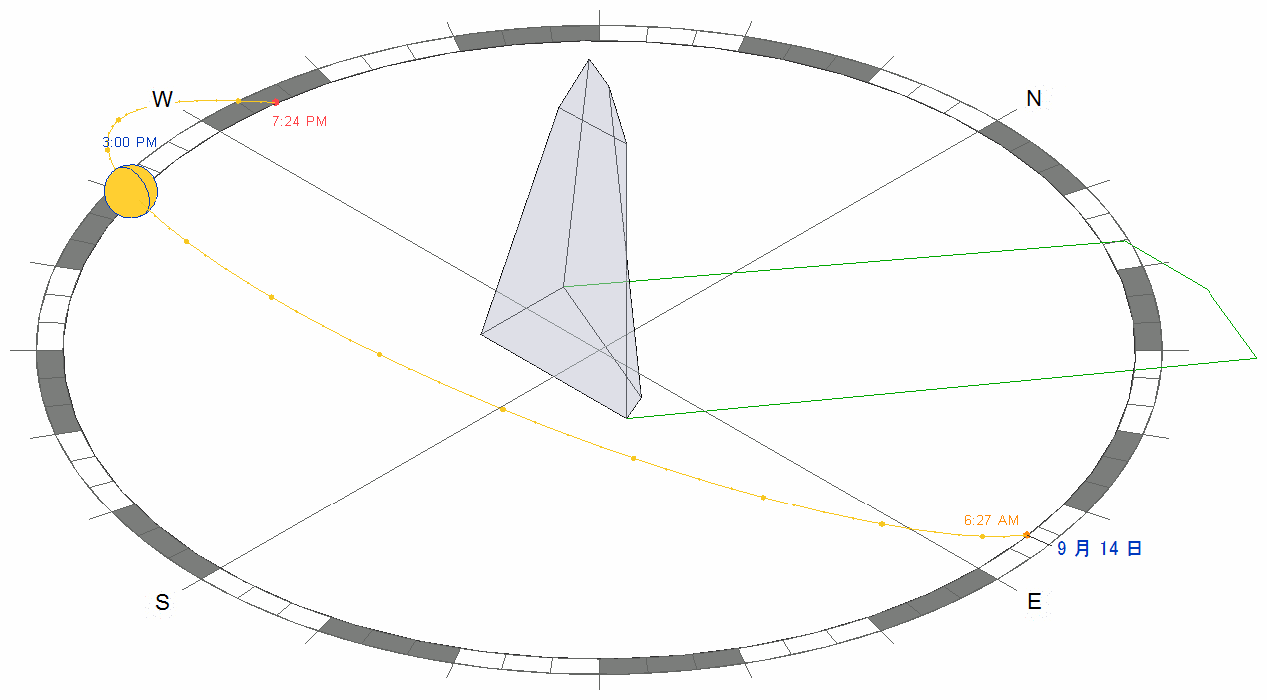
この例では、押し出しはアナライザを使用して、入力ソリッドと太陽の方向から形成される影を計算し、アウトラインを作成します。
|
コード領域: 影のアウトラインを計算して描画するために押し出しアナライザを使用 |
/// <summary>
/// Draw the shadow of the indicated solid with the sun direction specified.
/// </summary>
/// <remarks>The shadow will be outlined with model curves added to the document.
/// A transaction must be open in the document.</remarks>
/// <param name="document">The document.</param>
/// <param name="solid">The target solid.</param>
/// <param name="targetLevel">The target level where to measure and draw the shadow.</param>
/// <param name="sunDirection">The direction from the sun (or light source).</param>
/// <returns>The curves created for the shadow.</returns>
/// <throws cref="Autodesk.Revit.Exceptions.InvalidOperationException">Thrown by ExtrusionAnalyzer when the geometry and
/// direction combined do not permit a successful analysis.</throws>
private static ICollection<ElementId> DrawShadow(Document document, Solid solid, Level targetLevel, XYZ sunDirection)
{
    // Create target plane from level.
    Plane plane = document.Application.Create.NewPlane(XYZ.BasisZ, new XYZ(0, 0, targetLevel.ProjectElevation));

    // Create extrusion analyzer.
    ExtrusionAnalyzer analyzer = ExtrusionAnalyzer.Create(solid, plane, sunDirection);

    // Get the resulting face at the base of the calculated extrusion.
    Face result = analyzer.GetExtrusionBase();

    // Convert edges of the face to curves.
    CurveArray curves = document.Application.Create.NewCurveArray();
    foreach (EdgeArray edgeLoop in result.EdgeLoops)
    {
        foreach (Edge edge in edgeLoop)
        {
            curves.Append(edge.AsCurve());
        }
    }

    // Get the model curve factory object.
    Autodesk.Revit.Creation.ItemFactoryBase itemFactory;
    if (document.IsFamilyDocument)
        itemFactory = document.FamilyCreate;
    else
        itemFactory = document.Create;

    // Add a sketch plane for the curves.
    SketchPlane sketchPlane = SketchPlane.Create(document, document.Application.Create.NewPlane(curves));
    document.Regenerate();

    // Add the shadow curves
    ModelCurveArray curveElements = itemFactory.NewModelCurveArray(curves, sketchPlane);

    // Return the ids of the curves created
    List<ElementId> curveElementIds = new List<ElementId>();
    foreach (ModelCurve curveElement in curveElements)
    {
        curveElementIds.Add(curveElement.Id);
    }

    return curveElementIds;
}
|
上記のユーティリティを使用すると、現在の太陽とビューの影の設定を基準にして指定されたマスの影を計算できます。