解析結果の表示
AnalysisDisplayStyle クラスを使用すると、ビューにおける解析結果の表示方法をコントロールできます。静的 CreateAnalysisDisplayStyle()メソッドでは、色付きサーフェス表示スタイル、文字スタイル付きのマーカー、変形された形状スタイル、図スタイル、ベクトル スタイルを作成できます。いずれのスタイルも、色と凡例の設定を設定できます。
新しい AnalysisDisplayStyle を作成したら、View.AnalysisDisplayStyleId を使用してビューにスタイルを割り当てます。解析結果はドキュメントに保存されませんが、解析表示スタイルとそのビューへの割り当てはモデルに保存されます。
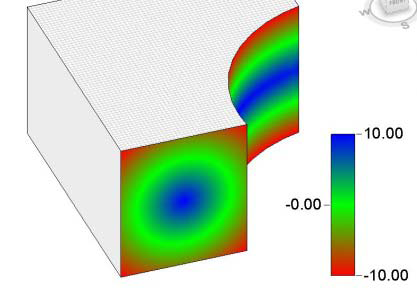
|
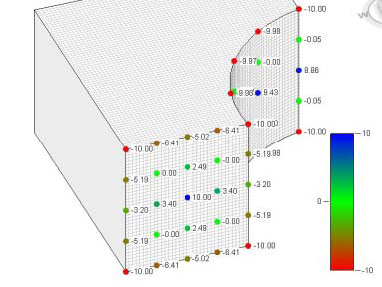
|
|
「色付きサーフェス」表示スタイル |
「文字付きマーカー」表示スタイル |
次の例では、新しい色付きサーフェス解析表示スタイルを作成し(まだドキュメントにスタイルがない場合)、現在のビューに割り当てます。
|
コード領域 27-2: ビューの解析表示スタイルを設定 |
Document doc = commandData.Application.ActiveUIDocument.Document;

AnalysisDisplayStyle analysisDisplayStyle = null;
// Look for an existing analysis display style with a specific name
FilteredElementCollector collector1 = new FilteredElementCollector(doc);
ICollection<Element> collection =
        collector1.OfClass(typeof(AnalysisDisplayStyle)).ToElements();
var displayStyle = from element in collection
                                        where element.Name == "Display Style 1"
                                        select element;

                                        // If display style does not already exist in the document, create it
if (displayStyle.Count() == 0)
{
        AnalysisDisplayColoredSurfaceSettings coloredSurfaceSettings = new AnalysisDisplayColoredSurfaceSettings();
        coloredSurfaceSettings.ShowGridLines = true;

        AnalysisDisplayColorSettings colorSettings = new AnalysisDisplayColorSettings();
        Color orange = new Color(255, 205, 0);
        Color purple = new Color(200, 0, 200);
        colorSettings.MaxColor = orange;
        colorSettings.MinColor = purple;

        AnalysisDisplayLegendSettings legendSettings = new AnalysisDisplayLegendSettings();
        legendSettings.NumberOfSteps = 10;
        legendSettings.Rounding = 0.05;
        legendSettings.ShowDataDescription = false;
        legendSettings.ShowLegend = true;

        FilteredElementCollector collector2 = new FilteredElementCollector(doc);
        ICollection<Element> elementCollection = collector2.OfClass(typeof(TextNoteType)).ToElements();
        var textElements = from element in collector2
                                                where element.Name == "LegendText"
                                                select element;
        // if LegendText exists, use it for this Display Style
        if (textElements.Count() > 0)
        {
                TextNoteType textType =
                        textElements.Cast<TextNoteType>().ElementAt<TextNoteType>(0);
                legendSettings.SetTextTypeId(textType.Id, doc);
        }
        analysisDisplayStyle = AnalysisDisplayStyle.CreateAnalysisDisplayStyle(doc, "Display Style 1", coloredSurfaceSettings, colorSettings, legendSettings);
}
else
{
        analysisDisplayStyle =
                displayStyle.Cast<AnalysisDisplayStyle>().ElementAt<AnalysisDisplayStyle>(0);
}
// now assign the display style to the view
doc.ActiveView.AnalysisDisplayStyleId = analysisDisplayStyle.Id;
|