階段を作成、編集する
StairsEditScope
Revit ドキュメント内の他のタイプの要素と同様に、階段と階段コンポーネントの編集にはトランザクションが必要です。ただし、階段経路や踊り場などの新しいコンポーネントを作成する場合や、新しい階段自体を作成する場合は、階段編集セッションを保持する Autodesk.Revit.DB.StairsEditScope オブジェクトが必要です。
StairsEditScope は TransactionGroup と同様の動作をします。StairsEditScope を開始した後、トランザクションを開始して階段を編集できます。StairsEditScope の内側に作成される個々のトランザクションは[元に戻す]メニューには表示されません。編集モード時にコミットされたすべてのトランザクションは 1 つのトランザクションに合成され、StairsEditScope コンストラクタに渡された名前が付けられます。
StairsEditScope には 2 つの開始メソッドがあります。1 つは、階段編集セッションを開始する既存の階段オブジェクトに ElementId を取ります。2 番目の開始メソッドは下部および上部レベルに ElementId を取り、指定したレベルに既定の階段タイプで空の階段要素を作成して、新しい階段の階段編集モードを開始します。
階段経路と踊り場を階段に追加して編集を完了した後、StairsEditScope.Commit()を呼び出して階段編集セッションを終了します。
階段経路を追加する
StairsRun クラスには、階段オブジェクトの新しい階段経路を作成するための静的メソッドが 3 つあります。
- CreateSketchedRun - 境界曲線と蹴上げ曲線のグループを指定して、スケッチされた経路を作成します。
- CreateStraightRun - 直線の階段経路を作成します。
- CreateSpiralRun - 中心、開始角度、中心角度を指定して、らせん階段経路を作成します。
踊り場を追加する
2 つの階段経路の間には自動踊り場かスケッチされた踊り場のいずれかを追加できます。静的メソッド StairsLanding.CanCreateAutomaticLanding()は、2 つの階段経路が自動踊り場を作成するための制限を満たしているかどうかを確認します。静的 StairsLanding.CreateAutomaticLanding()メソッドは、2 つの階段経路の間に作成したすべての踊り場の ID を返します。
静的 StairsLanding.CreateSketchedLanding メソッドは、踊り場の閉じた境界曲線を指定することで、2 つの階段経路の間にカスタマイズした踊り場を作成します。CreateSketchedLanding メソッドへの入力の 1 つに下部の高さの倍精度値があります。高さには次の制約があります。
- 下部の高さは階段の下部の高さを基準にします。
- 下部の高さは蹴上げの高さの倍数に自動的に丸められます。
- 下部の高さは蹴上げの高さの半分以上にする必要があります。
例
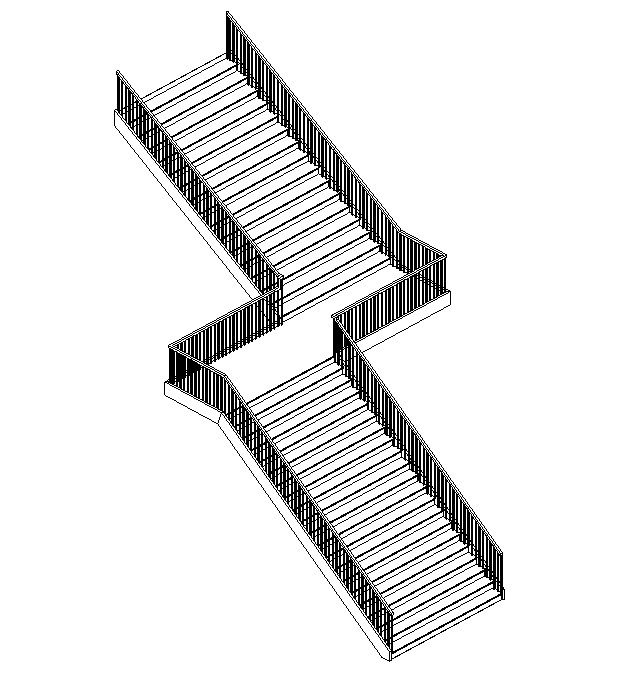
次の例では、2 つの階段経路(スケッチされた経路と直線経路)とそれらの間の踊り場の新しい階段オブジェクトを作成します。
|
コード領域: 階段、階段経路、踊り場を作成 |
// FailurePreprocessor class required for StairsEditScope
class StairsFailurePreprocessor : IFailuresPreprocessor
{
    public FailureProcessingResult PreprocessFailures(FailuresAccessor failuresAccessor)
    {
        // Use default failure processing
        return FailureProcessingResult.Continue;
    }
}

private ElementId CreateStairs(Document document, Level levelBottom, Level levelTop)
{
    ElementId newStairsId = null;

    using (StairsEditScope newStairsScope = new StairsEditScope(document, "New Stairs"))
    {
        newStairsId = newStairsScope.Start(levelBottom.Id, levelTop.Id);

        using (Transaction stairsTrans = new Transaction(document, "Add Runs and Landings to Stairs"))
        {
            stairsTrans.Start();

            // Create a sketched run for the stairs
            IList<Curve> bdryCurves = new List<Curve>();
            IList<Curve> riserCurves = new List<Curve>();
            IList<Curve> pathCurves = new List<Curve>();
            XYZ pnt1 = new XYZ(0, 0, 0);
            XYZ pnt2 = new XYZ(15, 0, 0);
            XYZ pnt3 = new XYZ(0, 10, 0);
            XYZ pnt4 = new XYZ(15, 10, 0);

            // boundaries
            bdryCurves.Add(Line.CreateBound(pnt1, pnt2));
            bdryCurves.Add(Line.CreateBound(pnt3, pnt4));

            // riser curves
            const int riserNum = 20;
            for (int ii = 0; ii <= riserNum; ii++)
            {
                XYZ end0 = (pnt1 + pnt2) * ii / (double)riserNum;
                XYZ end1 = (pnt3 + pnt4) * ii / (double)riserNum;
                XYZ end2 = new XYZ(end1.X, 10, 0);
                riserCurves.Add(Line.CreateBound(end0, end2));
            }

            //stairs path curves
            XYZ pathEnd0 = (pnt1 + pnt3) / 2.0;
            XYZ pathEnd1 = (pnt2 + pnt4) / 2.0;
            pathCurves.Add(Line.CreateBound(pathEnd0, pathEnd1));

            StairsRun newRun1 = StairsRun.CreateSketchedRun(document, newStairsId, levelBottom.Elevation, bdryCurves, riserCurves, pathCurves);

            // Add a straight run
            Line locationLine = Line.CreateBound(new XYZ(20, -5, newRun1.TopElevation), new XYZ(35, -5, newRun1.TopElevation));
            StairsRun newRun2 = StairsRun.CreateStraightRun(document, newStairsId, locationLine, StairsRunJustification.Center);
            newRun2.ActualRunWidth = 10;

            // Add a landing between the runs
            CurveLoop landingLoop = new CurveLoop();
            XYZ p1 = new XYZ(15, 10, 0);
            XYZ p2 = new XYZ(20, 10, 0);
            XYZ p3 = new XYZ(20, -10, 0);
            XYZ p4 = new XYZ(15, -10, 0);
            Line curve_1 = Line.CreateBound(p1, p2);
            Line curve_2 = Line.CreateBound(p2, p3);
            Line curve_3 = Line.CreateBound(p3, p4);
            Line curve_4 = Line.CreateBound(p4, p1);

            landingLoop.Append(curve_1);
            landingLoop.Append(curve_2);
            landingLoop.Append(curve_3);
            landingLoop.Append(curve_4);
            StairsLanding newLanding = StairsLanding.CreateSketchedLanding(document, newStairsId, landingLoop, newRun1.TopElevation);

            stairsTrans.Commit();
        }
        // A failure preprocessor is to handle possible failures during the edit mode commitment process.
        newStairsScope.Commit(new StairsFailurePreprocessor());
    }

    return newStairsId;
}
|
上記の例では次のような階段が作成されます。
手すりを追加する
StairsEditScope.Start(ElementId, ElementId)メソッドを使用して新しい階段を作成すると、既定の手すりが関連付けられます。ただし、Railing.Create()メソッドを使用すると、手すりのない階段の階段要素のすべての側面に、指定した手すりタイプを使用して新しい手すりを作成できます。StairsEditScope の使用が必要な階段経路と踊り場の作成と違い、開いた階段の編集セッション中は手すりの作成を実行できません。
既に手すりが関連付けられている階段には手すりを作成できないため、次の例では、新しい手すりを作成する前に、階段オブジェクトに関連付けられている既存の手すりを削除します。
|
コード領域: 手すりを作成 |
private void CreateRailing(Document document, Stairs stairs)
{
    using (Transaction trans = new Transaction(document, "Create Railings"))
    {
        trans.Start();

        // Delete existing railings
        ICollection<ElementId> railingIds = stairs.GetAssociatedRailings();
        foreach (ElementId railingId in railingIds)
        {
            document.Delete(railingId);
        }
        // Find RailingType
        FilteredElementCollector collector = new FilteredElementCollector(document);
        ICollection<ElementId> RailingTypeIds = collector.OfClass(typeof(RailingType)).ToElementIds();
        Railing.Create(document, stairs.Id, RailingTypeIds.First(), RailingPlacementPosition.Treads);
        trans.Commit();
    }
}
|