要素を移動する
ElementTransformUtils クラスには、ある場所から別の場所に 1 つまたは複数の要素を移動するための静的メソッドが 2 つあります。
表 19: 移動メソッド
|
メンバー |
説明 |
|
MoveElement( Document, ElementId, XYZ) |
ドキュメント内の要素を指定したベクトルで移動します。 |
|
MoveElements(Document, ICollection<ElementId>, XYZ) |
ドキュメント内の一連の ID を使用して、複数の要素を指定したベクトルで移動します。 |
- これらのメソッドでは、レベルベースの要素を、現在のレベルから上または下に動かせません。要素がレベルベースの場合、Z 座標値を変更することはできません。ただし、同じレベルであれば任意の位置に要素を配置することができます。同様に、一部のレベルベース要素にはオフセット インスタンス パラメータがあり、これを使用することで要素を Z 方向に移動させることができます。
たとえば、Level1 の元の位置(0, 0, 0)に新しい柱を作成し、新しい位置(10, 20, 30)に移動すると、柱は(10, 20, 30)ではなく(10, 20, 0)に配置されます。
コード領域 10-1: MoveElement()を使用
public void MoveColumn(Autodesk.Revit.DB.Document document, FamilyInstance column) { // get the column current location LocationPoint columnLocation = column.Location as LocationPoint; XYZ oldPlace = columnLocation.Point; // Move the column to new location. XYZ newPlace = new XYZ(10, 20, 30); ElementTransformUtils.MoveElement(document, column.Id, newPlace); // now get the column's new location columnLocation = column.Location as LocationPoint; XYZ newActual = columnLocation.Point; string info = "Original Z location: " + oldPlace.Z + "\nNew Z location: " + newActual.Z; TaskDialog.Show("Revit",info); } - 1 つまたは複数の要素を移動すると、関連付けられている要素も移動します。たとえば、窓のある壁を移動した場合、窓も移動します。
- 固定された要素は移動できません。
Revit では、要素を移動する別の方法として Location とその派生オブジェクトを使用する方法があります。Revit プラットフォーム API では、Location オブジェクトには要素を移動、回転する機能があります。Location の派生オブジェクト(LocationPoint や LocationCurve など)を使用すると、さらに位置情報やコントロールを使用することができます。Location 要素を LocationCurve オブジェクトや LocationPoint オブジェクトにダウンキャストすると、曲線や点を新しい場所に直接移動します。
|
コード領域 10-2: Location を使用して移動 |
bool MoveUsingLocationCurve(Autodesk.Revit.ApplicationServices.Application application, Wall wall)
{
        LocationCurve wallLine = wall.Location as LocationCurve;
        XYZ translationVec = new XYZ(10, 20, 0);
        return (wallLine.Move(translationVec));
}
|
要素を移動する場合、そのベクトル(10, 20, 0)は移動先ではなくオフセットとなる点に注意してください。次の図は、移動前後の壁の位置を示します。
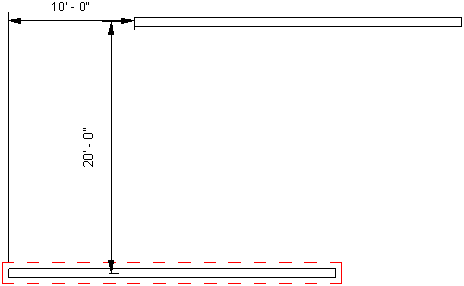
図 30: LocationCurve を使用して壁を移動
さらに、LocationCurve Curve プロパティや LocationPoint Point プロパティを使用すると、Revit 内の 1 つの要素を移動することができます。
曲線ドリブン要素を任意の指定した位置に移動するには、Curve プロパティを使用します。壁、梁、ブレースなど、多くの要素が曲線ドリブンです。また、要素の長さを変更する場合にもプロパティを使用します。
|
コード領域 10-3: Curve を使用して移動 |
void MoveUsingCurveParam(Autodesk.Revit.ApplicationServices.Application application, Wall wall)
{
    LocationCurve wallLine = wall.Location as LocationCurve;
    XYZ p1 = XYZ.Zero;
    XYZ p2 = new XYZ(10, 20, 0);
    Line newWallLine = Line.CreateBound(p1, p2);

    // Change the wall line to a new line.
    wallLine.Curve = newWallLine;
}
|
さらに、LocationCurve.JoinType プロパティを使用すると、曲線に基づく要素の結合プロパティを取得または設定することができます。
要素の物理的な位置を設定するには、LocationPoint Point プロパティを使用します。
|
コード領域 10-4: Point を使用して移動 |
void LocationMove(FamilyInstance column)
{
        LocationPoint columnPoint = column.Location as LocationPoint;
        if (null != columnPoint)
        {
                XYZ newLocation = new XYZ(10, 20, 0);
                // Move the column to the new location
                columnPoint.Point = newLocation;
        }
}
|