통합 단계 4a: 경로 가져오기 및 사용
AstarQuery를 사용하여 경로를 계산한 경우 AstarQuery::GetPath()를 호출하여 경로를 Path 오브젝트로 가져올 수 있습니다. Path 오브젝트는 반복할 수 있는 노드 및 가장자리 모음입니다.
예를 들어 다음 코드는 쿼리를 통해 계산된 경로를 가져와 각 프레임의 다른 위치에 있는 시각적 디버깅 시스템으로 화살표를 전송합니다. [Tutorial_FirstIntegration.cpp의 코드]
class MyGameLevel
{
public:
    ...
    void TestPath(Kaim::World* world);
    ...
};

...

void MyGameLevel::TestPath(Kaim::World* world)
{
    Kaim::ScopedDisplayList displayList(world, Kaim::DisplayList_Enable);
    displayList.InitSingleFrameLifespan("Test Path", "My Game");

    if (m_astarQuery->m_processStatus == Kaim::QueryDone)
    {
        Kaim::AStarQueryResult result = m_astarQuery->GetResult();
        if( result == Kaim::ASTAR_DONE_PATH_FOUND )
        {
            Kaim::Path* resultPath = m_astarQuery->GetPath();
            if( resultPath->GetEdgeCount() == 0 )
                return;

            // Let's fake an object moving on this path
            // in a very basic way.
            static KyFloat32 ratio = 0.0f;
            ratio += 0.00005f;
            if( ratio > 1.0f )
                ratio = 0.0f;
            KyFloat32 positionRatio = ratio * resultPath->GetEdgeCount();
            KyUInt32 currentEdge = (KyUInt32)floorf(positionRatio);
            Kaim::Vec3f edgeStart = resultPath->GetNodePosition(currentEdge);
            Kaim::Vec3f edgeEnd = resultPath->GetNodePosition(currentEdge+1);
            Kaim::Vec3f objectPosition = edgeStart + (positionRatio-currentEdge)*(edgeEnd-edgeStart);

            Kaim::VisualShapeColor shapeColor;
            shapeColor.m_triangleColor = Kaim::VisualColor(255, 255, 0);
            shapeColor.m_lineColor     = Kaim::VisualColor(175, 175, 0);
            displayList.PushArrow(    objectPosition + Kaim::Vec3f(0.0f, 0.0f, 2.0f),
                                    objectPosition,
                                    0.05f, shapeColor);
        }
    }
}
테스트
Navigation Lab에서 게임에 연결하면 시작점에서 대상 점으로 이동하는 노란색 화살표가 표시됩니다. 이 화살표의 속도는 현재 따르는 가장자리의 길이에 비례합니다.
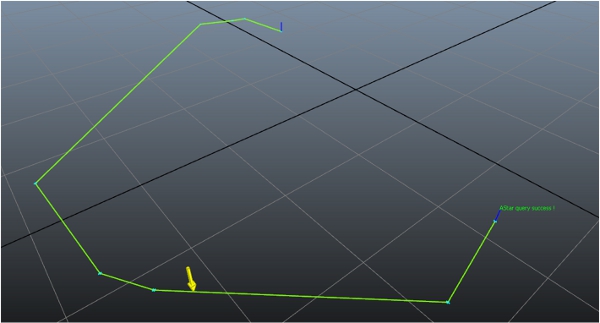
위에 제공된 코드는 사용자 고유의 목적을 위해 게임 코드에서 AstarQuery에 의해 생성된 경로를 액세스하고 사용할 수 있는 기본적인 방법에 대한 간단한 예에 불과합니다. 그러나 이 튜토리얼의 다음 단계에서는 Gameware Navigation에 내장된 다양한 기능의 경로 따르기 시스템을 소개합니다. 이 시스템은 캐릭터가 경로를 계산하고 따르는 데 즉시 사용할 수 있습니다.
 다른 설명이 없는 한, 이 저작물은 크리에이티브 커먼즈 저작자표시-비영리-동일조건변경허락 3.0 Unported 라이선스에 따라 이용할 수 있습니다.자세한 내용은 Autodesk 크리에이티브 커먼즈 FAQ (영문)를 참조하십시오.