통합 단계 1e: Visual Debugger로 데이터 전송
Navigation Lab의 연결을 허용하도록 게임을 설정한 경우 사용자 고유의 데이터, 모양 및 볼륨을 Navigation Lab으로 전송할 수 있습니다. Navigation Lab에는 Gameware Navigation의 기본 클래스에서 전송한 디버깅 데이터와 같은 데이터가 표시됩니다. 다른 모든 데이터와 마찬가지로 이러한 데이터를 기록하고, 클립에 저장하고, 재생할 수 있습니다.
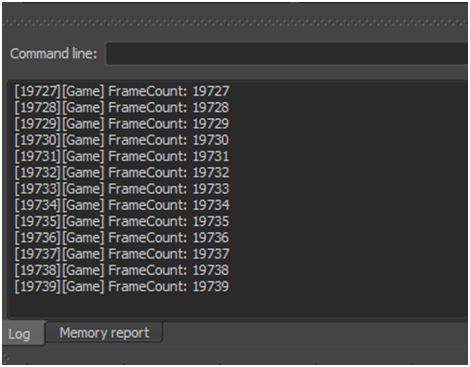
- KY_LOG_MESSAGE 매크로. BaseSystem에 대해 구성된 다른 모든 로그 출력과 함께 Navigation Lab의 Log 패널로 메시지를 보내려면 이 방법을 사용합니다.
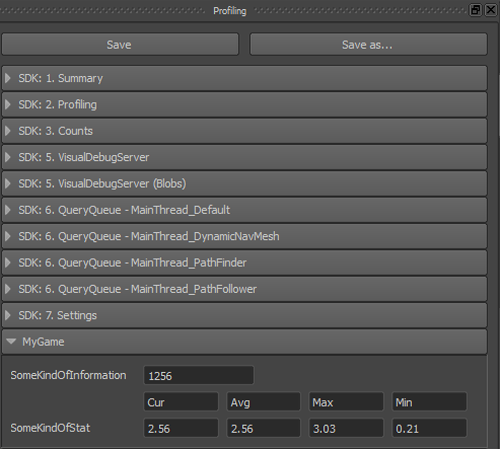
- VisualDebugServer 클래스의 메서드. 통계 및 데이터 값에 이 방법을 사용합니다.
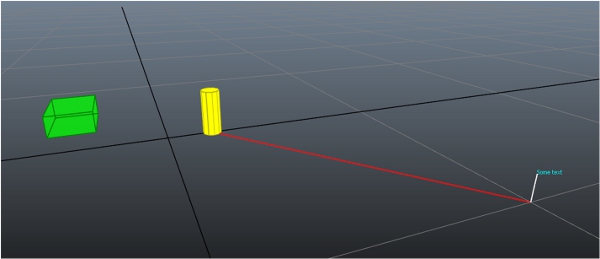
- ScopedDisplayList 오브젝트. Navigation Lab의 3D 보기에서 시각적 데이터를 렌더링하려면 이 방법을 사용합니다.
다음 코드 예제에서는 단일 프레임의 수명 기간을 가진 표시 목록을 만들어 전송하고 각 프레임에서 프로세스를 반복합니다. 하지만 표시 목록에 자주 변경되지 않는 데이터가 들어 있는 경우에는 단일 프레임 수명 기간 대신 사용자 정의 수명 기간을 가진 표시 목록을 만들고 한 번만 전송할 수 있습니다. 그러면 데이터를 변경하거나 제거할 때까지 각 프레임에서 해당 데이터가 표시됩니다. 이 대체 방법에 대한 자세한 내용은 시각적 디버깅을(를) 참조하십시오.
다음 코드 예제에서는 위 세 가지 방법을 모두 보여 줍니다.
- 시각적 디버깅 시스템이 Gameware Navigation 라이브러리의 Shipping 빌드에서 비활성화되었으므로 일반적으로 최상의 성능을 제공하려면 Shipping 라이브러리를 사용할 때 시각적 디버깅 코드를 실행하지 않는 것이 좋습니다. 예를 들어 #ifndef KY_BUILD_SHIPPING ... #endif 블록 내부에 코드를 포함할 수 있습니다.
- 또한 VisualDebugServer::IsConnected()를 호출하여 시각적 디버깅 시스템이 준비되었는지 테스트하는 것이 좋습니다. 이렇게 하면 시각적 디버그 서버가 설정되고 새 프레임이 시작되며 클라이언트가 연결됩니다.
이러한 권장 사항을 건너뛰어도 오류가 발생하지는 않지만 실제로 Navigation Lab으로 전송되지 않을 내부 오브젝트 만들기와 관련된 계산이 낭비됩니다.
[Tutorial_FirstIntegration.cpp의 코드]
#include "gwnavruntime/visualsystem/displaylist.h"
...

void MyGameWorld::TestVisualDebugger()
{
// Visual debugging is disabled in Shipping builds. Even though the symbols and functions are available, they do nothing.
// Guarding this code is not necessary, but is recommended in order to prevent useless computations.
#ifndef KY_BUILD_SHIPPING
    Kaim::VisualDebugServer* visualDebugServer = m_world->GetVisualDebugServer();

    // always check the state of the VisualDebugServer
    // to avoid costly construction of messages for nothing
    if (visualDebugServer->IsConnected() == false)
        return;

    const char* myCategoryName = "MyGame";

    // Sends a message to the Log window of the Navigation Lab
    static KyUInt32 framecount = 0;
    KY_LOG_MESSAGE(("FrameCount: %d", framecount));
    framecount++;

    // Sends a single data value
    KyUInt32 someKindOfInformation = 1256;
    visualDebugServer->SendUInt32("SomeKindOfInformation", someKindOfInformation, myCategoryName);

    // Sends current, average, max, and min stats computed by the game
    const char* someKindOfStat = "SomeKindOfStat";
    KyFloat32   currentValue   = 2.56f;
    KyFloat32   averageValue   = 2.56f;
    KyFloat32   maxValue       = 3.026f;
    KyFloat32   minValue       = 0.21f;
    visualDebugServer->SendStats(someKindOfStat, currentValue, averageValue, maxValue, minValue, myCategoryName);

    // Visual information is sent using a display list
    Kaim::Vec3f boxLowerCornerPosition = Kaim::Vec3f(-5.0f, -5.0f, 0.0f);
    Kaim::Vec3f boxExtents             = Kaim::Vec3f(3.0f, 2.0f, 1.0f);
    Kaim::Vec3f positionA              = Kaim::Vec3f(0.0f, 2.0f, 0.0f);
    Kaim::Vec3f positionB              = Kaim::Vec3f(10.0f, 10.0f, 0.0f);
    KyFloat32   radius                 = 0.4f;
    KyFloat32   height                 = 2.0f;

    // The Gameware Navigation coordinate system is Z-up, right-handed,
    // in meters. Always convert positions, vectors and sizes from the coordinate
    // system you use in your game. You can set up a Kaim::CoordSystem object, and use
    // its methods to do the conversions for you, as shown below.
    boxLowerCornerPosition = m_coordSystem.ClientToNavigation_Pos( boxLowerCornerPosition );
    boxExtents             = m_coordSystem.ClientToNavigation_Pos( boxExtents );
    positionA              = m_coordSystem.ClientToNavigation_Pos( positionA );
    positionB              = m_coordSystem.ClientToNavigation_Pos( positionB );
    radius                 = m_coordSystem.ClientToNavigation_Dist( radius );
    height                 = m_coordSystem.ClientToNavigation_Dist( height );

    {
        // Create a display list and send a line
        Kaim::ScopedDisplayList displayList(m_world, Kaim::DisplayList_Enable);
        displayList.InitSingleFrameLifespan("Simple Display List", myCategoryName);
        displayList.PushLine(positionB, positionB + Kaim::Vec3f::UnitZ(), Kaim::VisualColor::White);
        // The ScopedDisplayList is automatically sent to the Navigation Lab
        // when it goes out of scope.
    }

    {
        // Create a second display list and send more shapes
        Kaim::ScopedDisplayList displayList(m_world, Kaim::DisplayList_Enable);
        displayList.InitSingleFrameLifespan("Complex Display List", myCategoryName);

        Kaim::VisualShapeColor shapeColor;
        shapeColor.m_triangleColor = Kaim::VisualColor(255, 255, 0);
        shapeColor.m_lineColor     = Kaim::VisualColor(175, 175, 0);

        displayList.PushVerticalCylinder( positionA, radius, height, 10, shapeColor);
        displayList.PushLine( positionA, positionB, Kaim::VisualColor::Red);

        shapeColor.m_triangleColor = Kaim::VisualColor(0, 255, 0, 128);
        shapeColor.m_lineColor     = Kaim::VisualColor(0, 128, 0, 255);

        Kaim::Box3f someBox(boxLowerCornerPosition, boxLowerCornerPosition + boxExtents);
        displayList.PushBox(someBox, shapeColor);

        displayList.PushText( positionB + Kaim::Vec3f::UnitZ(), Kaim::VisualColor(0, 255, 255), "Some text");
        // Again, the ScopedDisplayList is automatically sent to the Navigation Lab
        // when it goes out of scope.
    }
#endif
}
Navigation Lab을 게임에 연결하면 이제 다음이 표시됩니다.
- Log 패널에 나열된 로그 메시지:
- Profiling 패널에 표시된 데이터 및 통계:
- 3D 보기에 표시된 비주얼 선 및 모양:
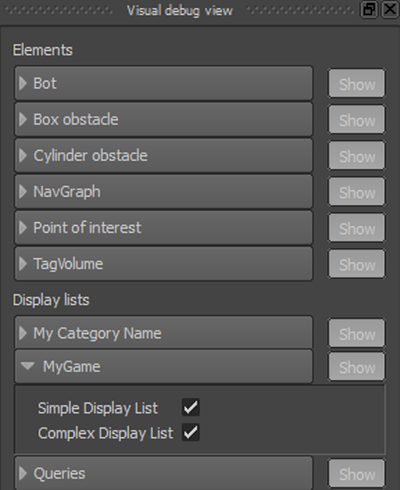
또한 Visual debug 패널에서 표시 목록에 전송된 데이터를 표시하고 숨길 수 있습니다. 표시 목록에 지정된 범주 이름이 패널의 맨 아래에 있는 Display lists 제목 아래에 표시됩니다. 이 범주를 확장하면 개별 표시 목록을 표시하고 숨길 수 있습니다.
 다른 설명이 없는 한, 이 저작물은 크리에이티브 커먼즈 저작자표시-비영리-동일조건변경허락 3.0 Unported 라이선스에 따라 이용할 수 있습니다.자세한 내용은 Autodesk 크리에이티브 커먼즈 FAQ (영문)를 참조하십시오.