Learn how to verify the deflection of newly created reinforcement areas.
- Continue working in your project or open the project Plate_Provided_Reinforcement_Modification.rtd.
Note: The Tutorial files are located in C:\ProgramData\Autodesk\Examples\Tutorials.
- Click
 (Analysis
  Verification).
The Verification dialog opens.
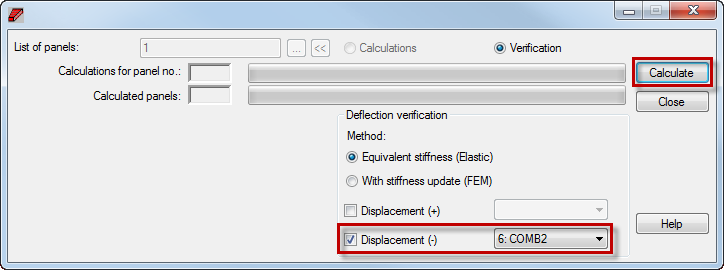
- In the Verification dialog, set the following options:
- Select Displacement (-), and ensure that 6: COMB2 is selected,
- Click Calculate.
- Close the Verification dialog.
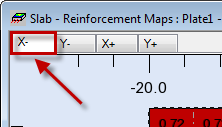
- In the top left corner of the Slab - Reinforcement Maps view select the X- tab.
The bottom provided reinforcement for the X direction displays in the view.
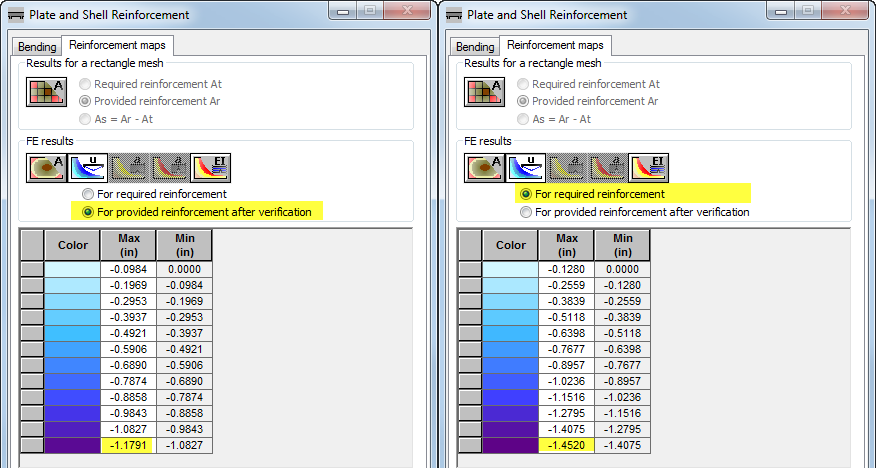
- In the Plate and Shell Reinforcement dialog, go to the Reinforcement maps tab, and set the following options:
- In the FE results group click
 (Deflection map),
 - Use the For provided reinforcement after verification and For required reinforcement options to compare the deflection before and after the verification.
- In the FE results group click
- Save the project as Plate_Provided_Reinforcement_Deflection.rtd.