If you need to display bitmaps while you use one of the legacy viewport drivers—Direct3D or OpenGL—then follow these steps.
The default viewport driver is the Nitrous driver. If you are not sure which driver 3ds Max currently uses, choose Customize  Preferences, go to the Viewports tab, and look at the Display Drivers group. If a Nitrous driver is active, you can skip these steps.
- On the main toolbar, choose Customize Preferences.
- Go to the Viewports tab, then click Display Drivers Configure Driver.
3ds Max opens the configuration dialog for the graphics driver you are using (OpenGL or Direct3D).
- Depending on the driver, there are either one or two checkboxes labeled Match Bitmap Size As Closely As Possible. If there is one, turn it on. If there are two, turn on both of them.
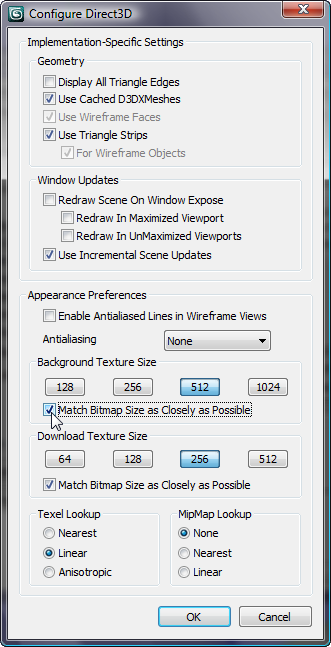
Configuration dialog for the Direct3D driver
- Click OK to close the driver configuration dialog, and OK again to close the Preferences dialog.
- If you had to turn on Match Bitmap Size As Closely As Possible, then exit 3ds Max. Restart 3ds Max before you continue work on the tutorials.
Bitmap configuration changes do not take effect immediately: You always have to restart 3ds Max.
If you did not have to change the Match Bitmap Size setting, you can continue without restarting 3ds Max.