Centerline Crosses
AutoCAD Mechanical now draws centerline crosses using two line segments. This allows centerline crosses to conform to drafting standards, by ensuring the centerlines always cross at a line, and never at a gap.
In previous releases, centerline crosses were drawn using four line segments. Often this would result in unpredictable results when you edit centerline crosses.
If required you can reset centerlines to its legacy behaviour by setting the AMCR2SEG system variable to 1.
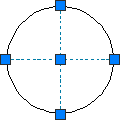 Centerline cross drawn using 2 lines |
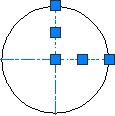 Centerline cross drawn using 4 lines |
Inferred Constraints
AutoCAD Mechanical Geometry creation commands are enhanced to support inferred constraints. While infer constraints is turned on, various geometrical constraints are inferred which maintain the object's shape and in the case of centerlines, its relationship with the underlying object. The enhanced commands are:
- AMCENTLINE
- AMRECTANGLE
- AMSYMLINE
