When you morph features from an Front1 clip to features from an Front2 clip or a background clip, you add a blend to the Front1. By blending the clip over time, the Front1 dissolves into the Front2 or the background. Matching features, for example, the mouth of an actor on the Front1 clip, and the mouth of an actor on the Front2 clip, as defined by the corresponding source and destination splines, can correspondingly blend from one to the other as the second clip becomes visible.
To blend the Front1 clip into the Front2 clip or background:
- From the Morph menu, adjust the value in the Blend box. A value of zero results in the Front1 clip being totally opaque, while a value of 100 results in the clip being completely transparent.
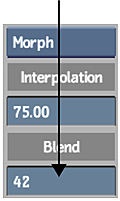 Tip: The blend value you set can be animated over time, and is displayed in the Channel Editor by a transparency channel in the Morph folder.