- Once you’ve added your effects in Batch, click the “Render” drop-down menu and select a Render mode. Options are:
- Scene All: This option performs a force render on all shots containing Batch Effects. This is useful when a modification is made in Lustre that would invalidate the Batch Effect (for example: modification of transcoding settings).
- Selection: This option force renders the selected shots that contain Batch Effects, and ONLY those shots. Rendered Batch Effects are not affected. If this option is set without a selection of shots, the Batch Effect of the current shot is force rendered.
- Scene: This option renders all unrendered Batch Effects in the current scene.
- Shot: This option force renders the current shot.
- Press the Render button to start the rendering.
If there are pre-existing renders in the Render destination path, you are prompted to either Cancel or Replace the pre-existing media.
- Press Alt+Tab to switch back to the Lustre interface. The "Enable" button, in the “Effects” tab, is automatically activated and the effects added in Flare are displayed. You can continue your grading work if needed. To disable the display of the effects added in Flare, simply toggle the "Enable" button to off.
The “Effects” tab in Lustre displays the “Batch Setup” filepath and the “Batch Renders” filepath (which may be adjusted in the Project Settings), as well as the current status of the different stages of the Lustre pipeline (all of the Lustre nodes in Flare).
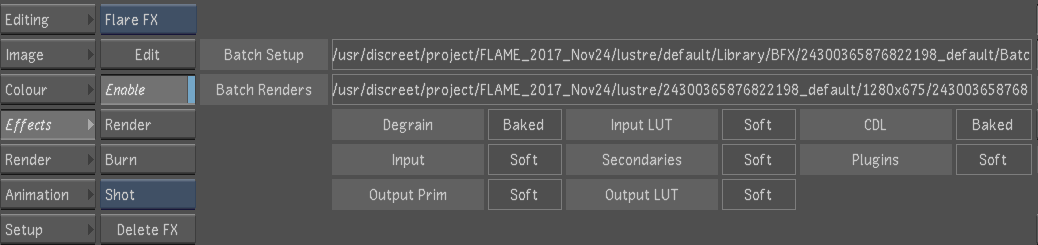
The steps marked as Baked are included in the Flare render whereas the steps marked Soft are applied live in Lustre on this new "source."
You can continue grading, on top of the rendered effects, using any of the stages of the Lustre pipeline that remain ‘Soft’. At any point, should you want to add more effects to your shot, click the “Edit” button under the Batch toggle to send the latest Lustre grade to Flare and automatically update the Batch Setup, while preserving the effect that was already built. BatchFX behave a lot like other aspects of a Lustre grade and may be copied from one shot to another and saved in the Grade Bin.