If you want to insert your effect somewhere inside the Lustre pipeline, you can Explode the Lustre node, by selecting it and choosing “Explode Lustre”, from the contextual menu.
This displays each stage of the Lustre pipeline as a Batch node, enabling you to add additional Batch nodes from Flare inside the Lustre pipeline. For example, a colorist may want to use the Input Primaries in Lustre, to balance the shot out and then insert and effect, say a Glow, and after that go through the Lustre Secondaries and Output.
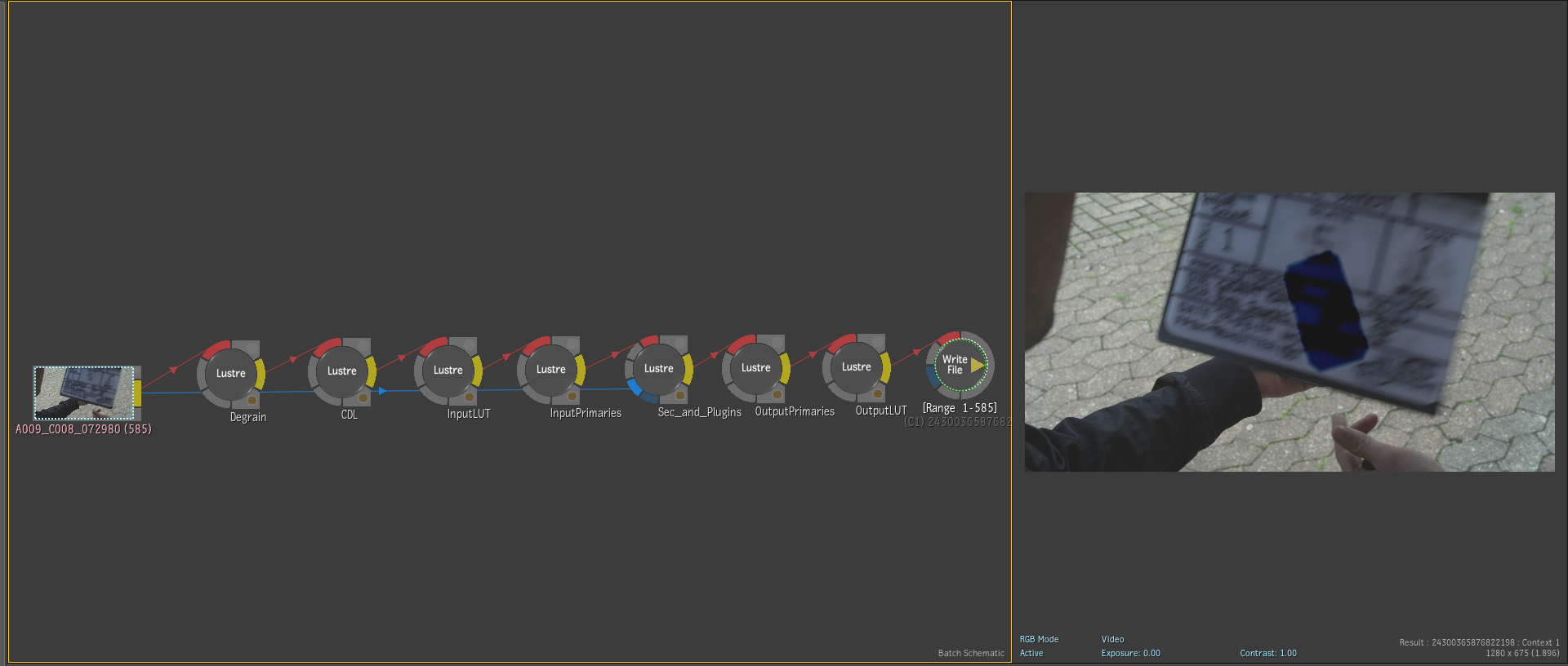
Note: In order to fully explode the Lustre node, you must (back in Lustre) go into Colour / Secondaries and enable Src: Prim before you create your BatchFX. Otherwise the parts of the Lustre pipeline before the Output Primaries will remain collapsed into the first node. (If you want to change the order of the Input LUT and CDL, you also need to do that before creating the effect.)
The fully exploded Lustre nodes are as follows:
- Degrain
- CDL
- Input LUT
- Input Primaries
- Secondaries and Plugins
- Output Primaries
- Output LUT
Selecting any of the Lustre node in the schematic view displays detailed information from the Lustre cut and grade, such as:
- Processing Stage: The part of the Lustre pipeline performed by this node.
- Shot Information: Shot Name, Shot ID, Reel Name.
- Grade Information: Grade, Scene, Project.
- Edit Information: Cut, Shot TC, Shot Offset.
- General: Workstation, User, Modified Date.
