Project-based Colour Management Options
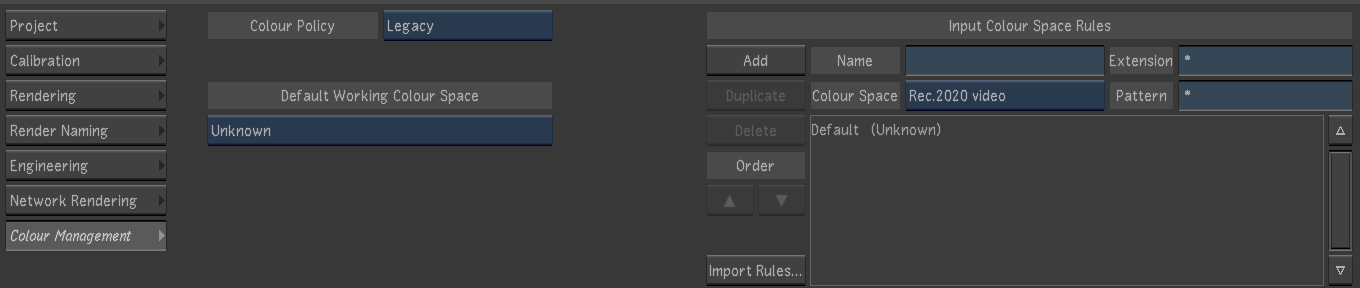
- Lustre 2017x1 supports Project-based Colour Management Policies and Project-basednColour Management Input Colour Space Rules Options.
- You can define Colour Space rules in Lustre the same way as Flame 2017 and above.
- You can select a Colour Policy when creating or editing a project. as well as define the Default Working Colour Space. Note: In Flame Premium projects, the project policy is shared with Flame.
- Lustre Premium (as part of Flame Premium) Colour Management Policies are located in: /opt/Autodesk/presets/(version)/synColor/policies/. In a Lustre standalone installation, they are located in: Lustre home folder/synColor/policies/.
- The rules file is located in the project home/synColor folder. For Flame Premium projects, the rules file is shared between Flame/Flare and Lustre. The rules file is also compatible with Autodesk Maya.
- Project Templates contain the Colour Management Policy.
- You can select the Project Working Space option in Colour Management Auto-Convert mode. This option is selected by default.
- There is now a REC 2020 option when working with an UHDTV or 4K AJA raster (YCbCr). The option is located in the Engineering menu of the Capture & Playout menus (SDI Options).
- It is possible to select a different rules file from another location using the (...) button. Doing this duplicates the selected rules files and overwrites the project-based file.
Note:
- When editing a project, the Reset All button does not reset the Color Management options since this could break the sharing of color management settings between Flame and Lustre. It is recommended to manually edit the requires options if needed.
- The gamma/PQ_encoding_to_nits.ctf is now used as the default for converting to the colour space used for Dolby Vision analysis. Render/Resize settings are now taken into account when calculating Dolby Vision analysis statistics, meaning that only the actual image region is used. This must be configured to prevent letterboxed areas from biasing the statistics.
For more in formation on Colour Management Policies, see: Flame Colour Management.