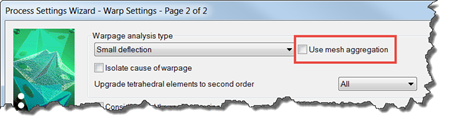
The mesh aggregation option for calculating warp, which transforms the original mesh into a coarser one, is now supported for the 3D residual stress model.
The computational time for a warpage analysis is significantly reduced when the Use mesh aggregation option is enabled, while still producing a result close to that of an analysis without mesh aggregation. As a result, the Use mesh aggregation option is on by default.
Note: Molded-in residual stress results are only available when the residual stress model is selected and mesh aggregation is turned off.
Limitations
- The mesh aggregation option is good for typical thin-walled parts, but is not recommended for chunky parts.
- It is only supported for the small deflection analysis type (not available for the large deflection or buckling analyses).
Basic workflow to disable this feature:
- Click
 () and choose a sequence that includes
Warp.
() and choose a sequence that includes
Warp.
- Click
 ().
().
- If necessary, click Next until you reach the Warp Settings page.
- Set the Warpage analysis type to Small deflection.
- Deselect Use mesh aggregation.