The easiest way to prepare a CAD mold mesh for use in a Cool (FEM) analysis, is to create a CAD mold block around your CAD part, inserts, cooling channels, and feed system using the Mold Block Wizard, and then to mesh it.
This feature is supported for the following mesh types:
 Dual Domain
 3D
3D
and for analysis sequences that include Cool (FEM).
To create a mold block, make sure that the layers hosting your CAD part, inserts, cooling channel curves and runner system curves are all visible. These components must all be visible for the mold to recognize them. Click
 (). The wizard creates a mold around your CAD part, inserts, cooling channel curves and runner system curves.
You can either create a CAD mold block, or you can create the mold as regions. By default, the mold is generated as regions, because this option is less dependent on the quality of your CAD model. If your CAD model is clean, with no modeling errors, then create the CAD mold block instead.
The advantage of creating a CAD mold block with the Mold Block Wizard is that only those mold components that are relevant to the analysis are included, so meshing is fast.
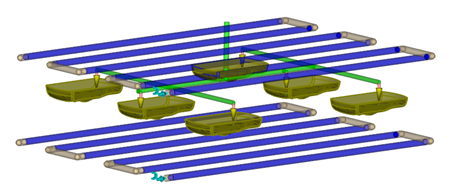
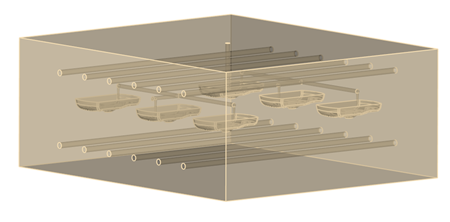
With the Mold Block Wizard, the CAD mold is constructed by subtracting internal components such as inserts, parts, the runner systems and the cooling system from a cuboid mold. You can save the resultant CAD mold into your study.
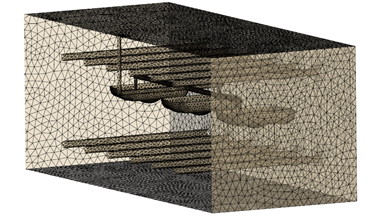
When you mesh the mold with the mold mesher, large edge lengths are assigned to the mold external boundary, while the edge lengths on mold internal boundary match the part edge length more closely.
Whether you select Create as CAD mold block, or whether you generate the mold block as regions, the mold dimensions are identical. In general, Create as CAD mold block takes slightly longer to generate. If you prefer, first create the mold block as regions, inspect and adjust the dimensions if necessary, and then create the CAD mold block. The mold block regions will be deleted.